ACLs filter specific traffic rules; firewalls enforce broader, stateful security controls.
If you have ever puzzled over access control list vs firewall, you are not alone. I have designed and run networks for years, from small offices to large cloud setups. In this guide, I break down access control list vs firewall in clear terms, with real examples and tested advice you can use today.

What is an access control list (ACL)?
An access control list is a set of rules. It says what traffic can pass and what must be blocked. In networks, ACLs live on routers, switches, and cloud subnets. They check each packet and match it to a rule.
Key traits of network ACLs:
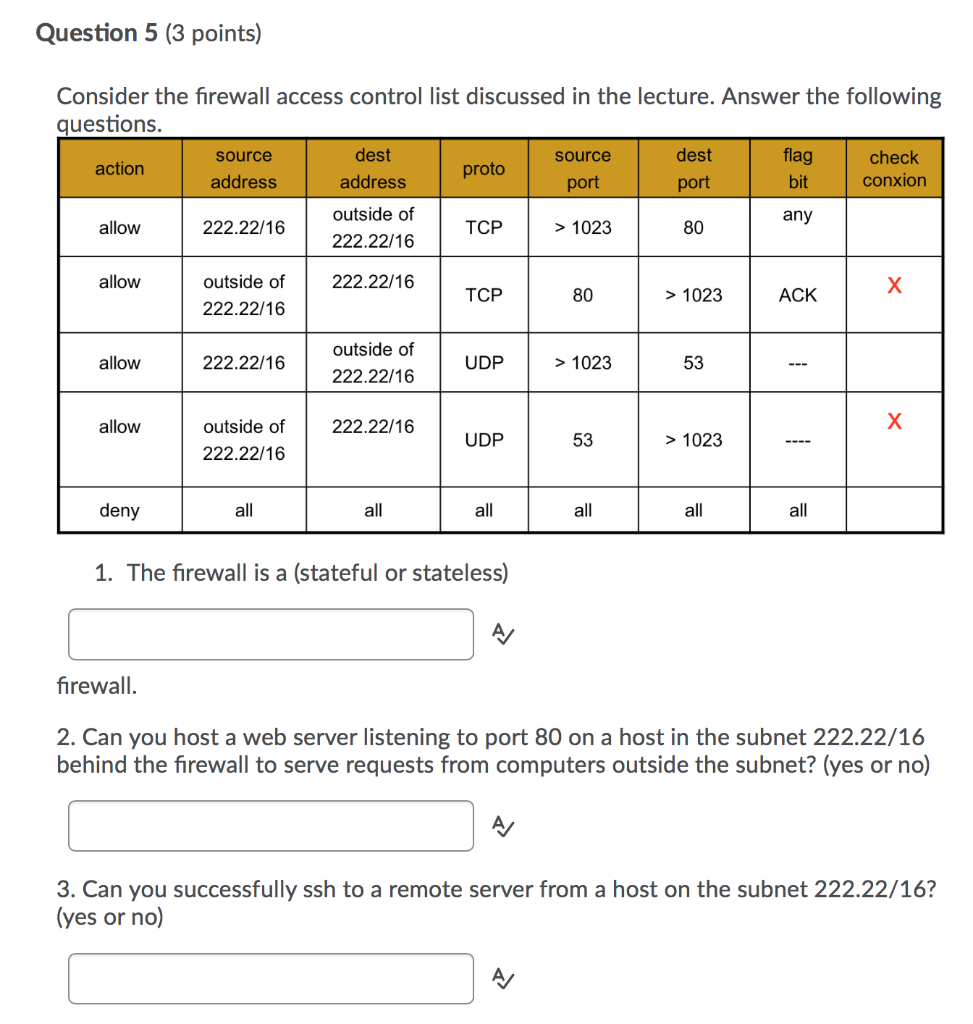
- Stateless filtering. Each packet is checked on its own.
- Works at IP and port level. Think source, destination, and protocol.
- Standard and extended types. Standard looks at source IP. Extended can match many fields.
- Ordered rules. The first match wins, then action is taken.
Common places you see ACLs:
- On routers to block unsafe inbound traffic.
- On Layer 3 switches for VLAN segmentation.
- In cloud platforms as subnet NACLs for basic packet control.
- On operating systems for file and folder permissions. Note this is a different use of ACLs.
Real talk from the field: ACLs are fast and simple. They work well at choke points. But they lack deep context. If you need session tracking or app awareness, an ACL alone is not enough.

What is a firewall?
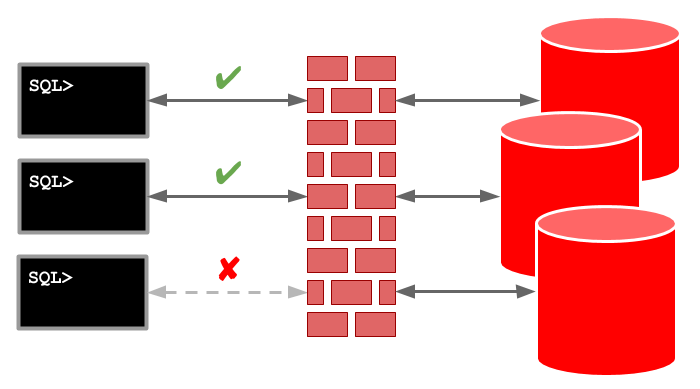
A firewall is a security device or service. It inspects traffic and enforces policy. Modern firewalls track the state of flows. They can look deep into the packet, even at the app layer.
What firewalls often include:
- Stateful inspection. The device knows which packets belong to which session.
- Deep packet inspection. It can see apps like DNS, HTTP, and SSH.
- Extra tools. NAT, VPN, web filtering, IPS, and malware blocks.
- Rich logs and reports. This helps with audits and alerts.
- High availability features. Think failover and clustering.
You will find two styles:
- Network firewalls. At the edge, in data centers, and in clouds as virtual devices.
- Host firewalls. On servers and endpoints to control local traffic.
From real projects: a firewall is your main guard. It sees the big picture. It enforces least privilege, and it gives you clear logs. But it needs care, updates, and skill to run well.
Access control list vs firewall: key differences
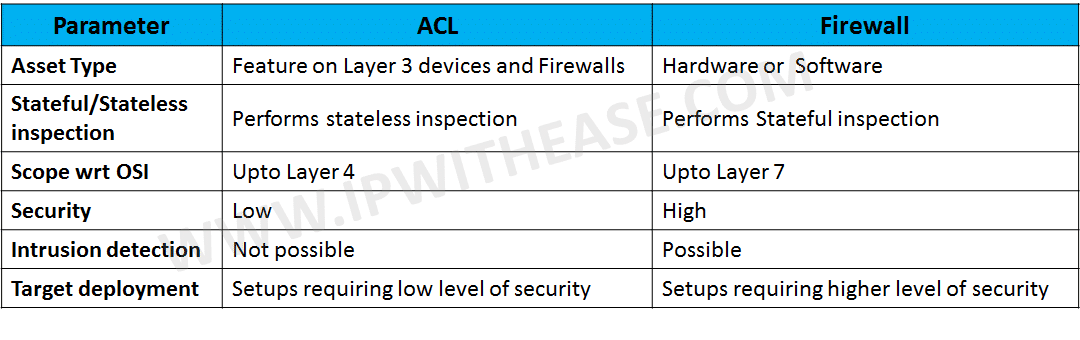
You want a clear view of access control list vs firewall. Here is the clean split I use with teams:
- Scope
- ACL: Narrow control at the device or subnet.
- Firewall: Wide control at network edges and key zones.
- Traffic awareness
- ACL: Stateless. No session tracking.
- Firewall: Stateful. Knows sessions and context.
- Depth of inspection
- ACL: IP, port, and protocol.
- Firewall: App layer, user identity, content scanning.
- Features
- ACL: Allow or deny. Light logging.
- Firewall: NAT, VPN, IPS, threat feeds, more.
- Management
- ACL: Simple but can grow messy with many rules.
- Firewall: Central tools, change control, rich logs.
- Performance
- ACL: Very fast, low overhead on hardware.
- Firewall: Fast, but features can add some latency.
- Cost
- ACL: Built in on routers and switches.
- Firewall: License and support costs.
- Compliance
- ACL: Basic enforcement and logs.
- Firewall: Detailed logging and policy mapping for audits.
When teams debate access control list vs firewall, I ask two things. Do you need stateful checks? Do you need app or user awareness? If yes to either, you need a firewall in the design.

When to use ACLs, when to use firewalls
Good fits for ACLs:
- Simple north-south blocks on a router.
- VLAN-to-VLAN rules on a Layer 3 switch.
- Cloud subnet controls with a small rule set.
- High speed filtering near the line rate.
Good fits for firewalls:
- Internet edges and DMZ protection.
- East-west segmentation between sensitive zones.
- User identity or app-based rules.
- Threat detection and IPS needs.
- Remote work with VPN and split tunneling.
Blended approach I use in real networks:
- ACLs for coarse filters. Drop known bad or unneeded ports.
- Firewalls for fine control. Enforce least privilege by app and user.
- Host firewalls for last-mile blocks.
- Cloud security groups for instance-level rules.
A common mistake: trying to replace a firewall with a large ACL set. That grows hard to manage and audit. Another mistake: using only a firewall and skipping simple ACLs that can block junk early. The best access control list vs firewall plan often uses both.
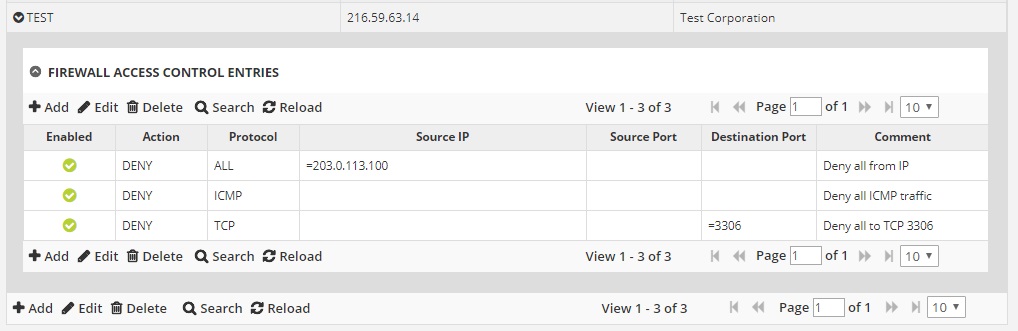
Real-world configuration examples
Simple extended ACL on a Cisco router:
ip access-list extended WEB-IN
 permit tcp any host 203.0.113.10 eq 443
 deny   tcp any host 203.0.113.10 eq 80
 deny   ip any any
!
interface GigabitEthernet0/0
 ip access-group WEB-IN in
This allows HTTPS to a public IP. It blocks HTTP. It denies all else by default.
Linux host firewall with nftables (stateful):
table inet filter {
 chain input {
   type filter hook input priority 0;
   ct state established,related accept
   iif lo accept
   tcp dport 22 accept
   tcp dport 443 accept
   counter drop
 }
}
This tracks states. It allows SSH and HTTPS. It drops other new traffic.
Cloud example tip:
- Use subnet NACLs for broad allow or deny.
- Use security groups on instances for fine rules.
- Place a virtual firewall for app control and IPS.
What I learned: test rule order. Use comments. Stage changes in a lab first. Build a rollback plan. These steps save long nights.

Performance, security, and compliance considerations
Performance notes:
- ACLs use hardware TCAM on switches and run fast.
- Firewalls also run fast, but deep scans add some cost.
- Rule order matters. Place common allows near the top.
Security notes:
- ACLs stop known bad ports. They do not see app tricks.
- Firewalls detect and block patterns and threats.
- Host firewalls block lateral moves inside a subnet.
Compliance notes:
- Many standards ask for logging and change control.
- Firewalls give strong logs and easy exports.
- ACL logs can be light. Plan external logging for audits.
From audits I have joined: clear names, clear comments, and regular reviews make a big difference. Review rules each quarter. Remove what you do not need. This helps both ACLs and firewalls.
Best practices and common pitfalls
Best practices:
- Start with a deny-all stance and allow only what you need.
- Keep rules short and clear. Use object groups where you can.
- Name rules and add comments for intent.
- Test changes in a safe place. Then roll to prod.
- Log key rules. Send logs to a SIEM.
- Review and clean rules often.
Common pitfalls:
- Shadowed rules due to bad order.
- Wide any-any allows that bypass your goals.
- No change record. You forget why a rule exists.
- Set and forget devices. Firmware and signatures go stale.
A helpful check: read your policy out loud. If it sounds vague, your rules likely are too. When teams ask about access control list vs firewall, I show them how clear goals make both work better.
How to choose: A quick decision guide
Use this simple guide when you weigh access control list vs firewall:
- Do you only need to block a few ports or IPs at high speed? Choose ACLs.
- Do you need session tracking, user ties, or app control? Choose a firewall.
- Do you need IPS, web filter, or threat intel? Choose a firewall.
- Do you have strict audit needs and need rich logs? Choose a firewall.
- Do you want a cheap, simple block close to the source? Add ACLs.
- Do you want defense in depth? Use both.
In many builds, I layer them. ACLs cut noise first. Firewalls handle the smart checks. Host firewalls lock down the last hop.
Cost and operational impact
Cost factors:
- ACLs are built in on network gear. They cost time, not a new tool.
- Firewalls add licenses, support, and training.
Operational factors:
- ACLs are simple but can sprawl in big networks.
- Firewalls centralize policy and logs but need care and updates.
- Automation helps both. Use templates and code to avoid drift.
An honest take: the cheapest tool is not always the best. Look at risk, skill, and time. Over the long run, a good access control list vs firewall mix lowers cost by avoiding incidents and waste.
Frequently Asked Questions of access control list vs firewall
Is an ACL the same as a firewall?
No. An ACL filters packets with simple rules and no session state. A firewall adds state, app awareness, and many security features.
Can a firewall replace all ACLs?
Not always. Firewalls do the heavy work, but ACLs can block junk early and save resources. Many designs use both for best results.
Are cloud NACLs the same as security groups?
No. NACLs are stateless and tied to subnets. Security groups are stateful and tied to instances, which feels closer to a firewall.
Do ACLs impact performance more than firewalls?
ACLs are very light and often hardware accelerated. Firewalls are fast too, but deep inspection can add small latency.
How often should I review rules?
Quarterly is a good cadence. Review after major changes, audits, or incidents, and remove rules that are no longer needed.
Do I need a next-gen firewall for small offices?
It depends on risk and budget. If you host data or need IPS and VPN, a small NGFW is worth it; otherwise, start with basics and grow.
What logs should I keep for compliance?
Keep allow and deny logs for key rules, admin changes, and system events. Ship them to a central store and keep for your audit window.
Conclusion
You now have a clear view of access control list vs firewall and how they work together. ACLs give fast, simple blocks. Firewalls give deep, stateful control with rich logs and added protection.
Pick the right tool for each job. Start small, test often, and document your intent. Then layer controls for strong, simple, and clear security. Want more guides like this? Subscribe, share your questions, or leave a comment with your use case.