Imagine playing your favorite PS5 games with the added security and freedom that a VPN offers. Sounds appealing, right?
You're not alone in wondering if you can use a VPN on your PS5. In this digital age, where online privacy and unrestricted content access are key, many gamers are exploring this option. But how exactly does it work, and is it worth the effort?
You're about to discover how a VPN can transform your gaming experience, offering enhanced privacy, access to region-specific content, and even improved connection stability. Ready to unlock the full potential of your PS5? Let's dive into the possibilities that await you. Can you VPN on PS5?
Since the PlayStation 5 doesn’t support direct VPN apps, many players use workarounds to secure their connection and access global content. By setting up a VPN on your router, sharing a PC or Mac connection, or using Smart DNS, you can improve privacy, reduce lag, and unlock region-restricted games and streaming services.
Vpn Basics For Ps5
Ever wondered if you can use a VPN on your PS5? You're not alone. Many gamers are exploring ways to enhance their gaming experience, and using a VPN is one of them. Whether you're looking to access games from different regions or protect your privacy, understanding VPN basics for your PS5 is crucial. Let's dive into what a VPN is and how it can benefit your gaming console.
What Is A Vpn?
A VPN, or Virtual Private Network, is like your own secret pathway on the internet. It helps you connect to the web securely by encrypting your data. Imagine you’re sending a letter but it’s sealed in a locked box—only you and the recipient have the key.
With a VPN, your online activities are hidden from prying eyes, including hackers and even your internet service provider. This is particularly useful when you're gaming on your PS5, as it ensures your data is safe.
Benefits Of Vpn On Gaming Consoles
Using a VPN on your PS5 comes with perks that could transform your gaming experience. First, it opens doors to games and content from different regions. Have you ever been frustrated because a game isn’t available in your country? A VPN can solve that.
Furthermore, your online privacy is enhanced. You can play without worrying about who might be watching or collecting your data. It's like having a shield while you dive into your favorite games.
Additionally, a VPN can help reduce lag during online play. Imagine smoother gameplay without those annoying hiccups. You might just outperform your friends in that next online match!
As you consider whether a VPN is right for your PS5, think about what matters most to you. Is it accessing exclusive content or securing your online interactions? Or maybe it's both. Whatever your answer, taking the time to understand VPN basics can provide valuable insights.

Credit: www.youtube.com
Setting Up Vpn On Ps5
Setting up a VPN on your PS5 can be a bit tricky. VPNs enhance online privacy and security. They also unlock access to geo-restricted content. While the PS5 doesn't support direct VPN apps, there are ways to connect. This section will guide you through alternative methods.
Direct Vpn Installation Challenges
The PS5 doesn't allow direct VPN installation. It lacks native support for VPN apps. This limits how users can directly apply VPN settings. Without direct support, gamers face a challenge. They can't install VPNs like they would on computers or smartphones.
Alternative Methods To Connect
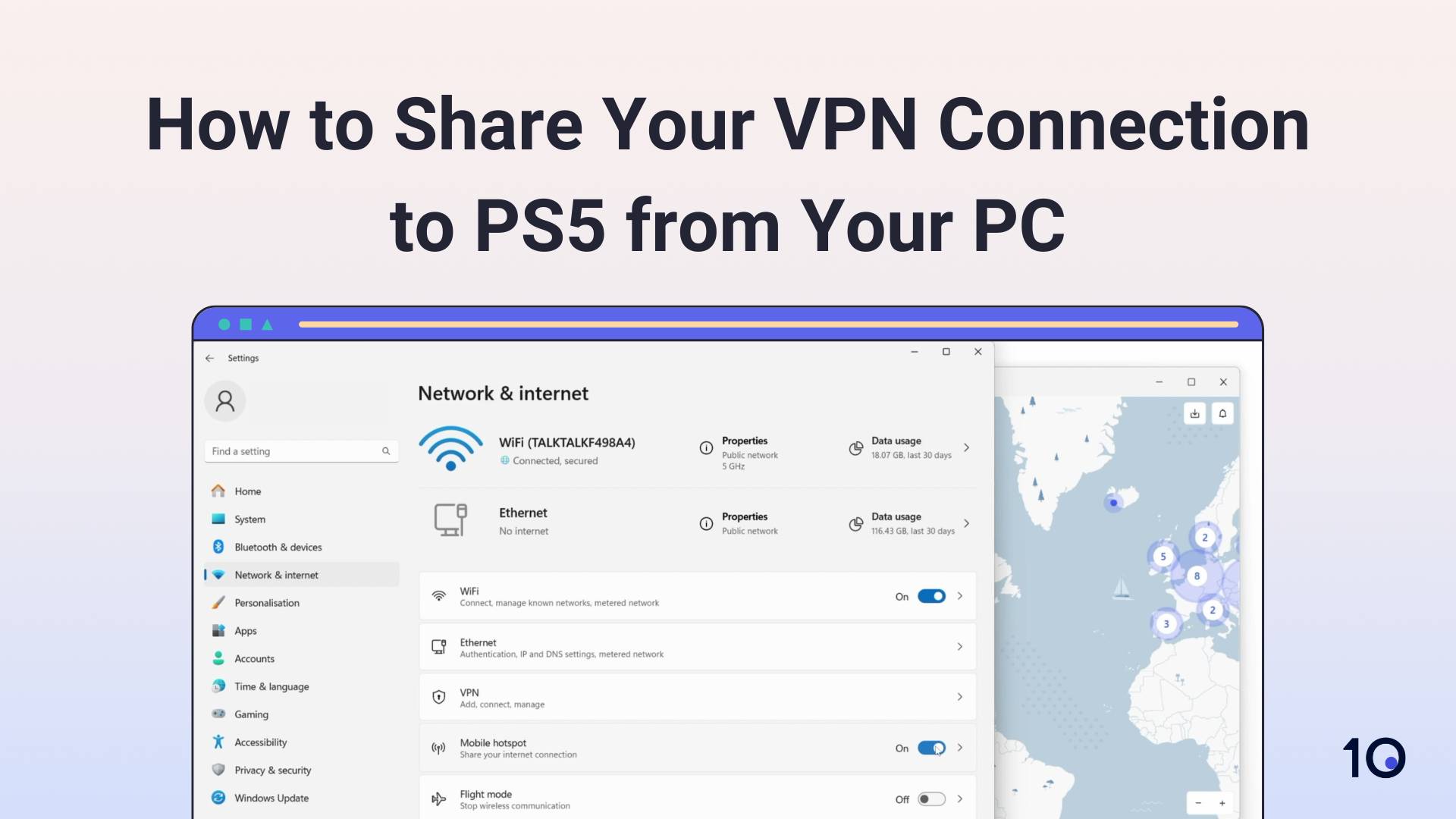
Using a router is one alternative. Many routers support VPN connections. Setting up a VPN on a router covers all devices connected to it. This includes your PS5. Another method involves using a computer. Connect your PS5 to a computer with VPN access. Share the computer's internet connection with the PS5. Both methods require some technical knowledge.
Cloud-based VPN services can also work. They don't need direct installation on the console. You access them through a connected device. Ensure your chosen method suits your needs. Always check compatibility and ease of setup.
Choosing The Right Vpn Provider
Choosing the right VPN provider for your PS5 can be crucial. VPNs enhance your gaming experience by providing privacy and security. They can help access geo-restricted content. Many players use VPNs to reduce lag. But, not every VPN suits gaming needs. Selecting the best VPN requires careful consideration.
Key Features To Consider
Speed is vital for gaming. Slow VPNs cause lag. Choose a provider with fast servers. Security matters too. Look for strong encryption and no-log policies. Ensure the VPN has a user-friendly interface. Compatibility with PS5 is essential. Check if the VPN supports routers. Some VPNs offer dedicated gaming servers. These can improve performance. Pricing should be reasonable. Avoid free VPNs; they may lack features.
Top Vpn Recommendations
ExpressVPN is popular among gamers. It offers fast servers and strong security. NordVPN provides dedicated servers for gaming. It's reliable and easy to use. Surfshark is budget-friendly with good speeds. It supports unlimited devices. CyberGhost has specialized gaming servers. It's known for user-friendly apps. Consider these options for your PS5 VPN needs.
Credit: www.top10vpn.com
Enhancing Online Privacy
Using a VPN on your PS5 can enhance your online privacy. It adds a layer of security, ensuring your data remains safe. This is especially important during online gaming sessions. A VPN can help mask your online activities, making it hard for others to track you. Many gamers use VPNs to safeguard their personal information. This is crucial in today's digital age.
Protecting Personal Data
Online gaming often requires sharing personal data. This includes your name, email, and sometimes payment details. A VPN helps protect this sensitive information. It encrypts your data, making it unreadable to hackers. This reduces the risk of identity theft. With a VPN, your data travels through a secure tunnel. Only you and the intended receiver can access it. This ensures your information remains private.
Preventing Geo-tracking
Geo-tracking is a common concern for many gamers. Websites and apps track your location to offer targeted content. A VPN can prevent this by hiding your real IP address. It assigns you a new IP from a different location. This makes it appear as if you are in another country. As a result, geo-tracking becomes difficult. You gain control over what others see about your online presence.
Improving Gaming Experience
Gaming on the PS5 is an exhilarating experience. But sometimes lag disrupts the fun. VPNs can enhance your gaming in multiple ways. They help reduce lag and let you access global content. Here's how VPNs improve your PS5 gaming.
Reducing Lag And Latency
Lag can ruin a gaming session. It affects your gameplay precision. VPNs can route your data through faster servers. This reduces lag and improves response times. With lower latency, your gaming feels smoother. You enjoy real-time action without delays.
Accessing Global Content
Some games are region-locked. You miss out on exclusive content. VPNs bypass these restrictions. Connect to servers worldwide to access global game versions. Discover new game modes and features. Explore content not available in your region.

Credit: www.youtube.com
Troubleshooting Vpn Issues
Setting up a VPN on your PS5 can enhance your gaming experience by boosting privacy and bypassing geo-restrictions. However, you might face some hiccups along the way. It's not uncommon for users to encounter connection problems or experience slower internet speeds. Don't let these issues discourage you. Let's dive into some common VPN problems and quick fixes that can get you back in the game.
Common Connection Problems
Sometimes, the connection might drop suddenly, leaving you puzzled. You could be facing issues due to an unreliable VPN service or incorrect settings. Another common problem is the VPN not connecting at all. This might be due to compatibility issues or outdated firmware on your router.
You've probably experienced lag during gameplay, which can be frustrating. This might occur if the VPN server is too far from your location or overloaded with users. It's crucial to identify these issues early to avoid disrupting your gaming sessions.
Steps For Quick Fixes
First, ensure your VPN service is reliable and offers good support. Check if your router firmware is up-to-date. This can resolve many connectivity issues and improve performance.
Try switching to a server closer to your location. This can significantly reduce lag and improve speed. If you’re connected to a distant server, your data travels further, slowing down your connection.
Consider resetting your router and VPN settings. A fresh start can sometimes resolve persistent issues. Also, double-check your VPN’s compatibility with PS5. Not all VPNs work seamlessly with gaming consoles.
Have you ever wondered why your VPN slows your connection? It’s usually due to encryption processes. Experiment with different VPN protocols to find one that balances security and speed.
Ultimately, don't forget to reach out to your VPN provider if problems persist. They can offer tailored advice and might even surprise you with a solution you hadn't considered.
Troubleshooting VPN issues on your PS5 doesn’t have to be daunting. With these quick fixes, you can enhance your gaming experience without compromising on privacy and security.
Frequently Asked Questions
Can I Put Nordvpn On My Ps5?
NordVPN isn't directly installable on PS5. Use it through a router or share VPN connection from a PC. This secures your console's internet connection, enhancing privacy and bypassing geo-restrictions. Ensure your router supports VPN configuration for optimal setup.
How Do I Know If My Vpn Is Working On Ps5?
Check your PS5's IP address; it should match the VPN server's location. Test internet speed and access geo-restricted content to confirm. Ensure VPN connection status is active on the device.
What Is The Best Vpn For Ps5?
ExpressVPN is a top choice for PS5. It offers fast speeds and strong security features. NordVPN is another reliable option, known for its extensive server network. Both provide excellent gaming experiences and privacy protection. Choose based on your specific needs and budget preferences.
How To Change Vpn Location On Ps5?
Install a VPN on your router to change the PS5 location. Choose a server in your desired country. Configure the router with VPN settings, ensuring your PS5 connects to it. This changes the VPN location, allowing access to geo-restricted content.
Always check VPN compatibility with your router model.
Conclusion
Using a VPN on PS5 enhances your gaming experience. It provides better privacy and security. Access more content and protect your data. Setup is straightforward with the right tools. Ensure you choose a reliable VPN service. This ensures smooth gameplay without interruptions.
Always consider speed and server locations. These factors impact your gaming quality. A VPN can be a valuable addition for PS5 users. Enjoy gaming with more peace of mind.