You’ve heard the promises: project management tools will revolutionize your workflow, boost your team’s productivity, and keep every deadline in check. But what if the reality isn’t as rosy as it seems?
Before you invest your time and resources into these tools, it’s crucial to understand the potential pitfalls. What if the tool complicates rather than simplifies? Or if it drains your budget more than it delivers results? You’ll uncover the hidden disadvantages of using project management tools.
You’ll learn why, in some cases, going digital might not be the dream solution you expected. Stick with us, and you might just save yourself from making a costly mistake.
Complex Implementation
Project management tools offer many benefits, but they can be difficult to implement. Complex implementation is one of the major hurdles organizations face. This challenge can slow down productivity and create confusion among team members.
Understanding Complex Implementation
Many tools require extensive setup before they are ready for use. Teams often need to spend time learning new systems. This process can be time-consuming and frustrating.
Technical Challenges
Implementing project management tools often involves technical hurdles. Integration with existing systems can be complicated. Teams may need expert support to resolve technical issues.
User Resistance
Employees may resist changes and prefer familiar methods. This resistance can delay implementation. Training sessions can help, but they require time and resources.
Resource Allocation
Complex implementation demands careful resource planning. Teams need to allocate time for learning new tools. Budget constraints can further complicate the process.
Customization Needs
Every organization has unique needs. Customizing tools to meet specific requirements can be challenging. Customization often requires specialized skills and additional resources.
Time Consumption
Complex implementation processes can be time-consuming. Long setup times can delay project start dates. Teams may struggle to meet deadlines due to extended implementation phases.
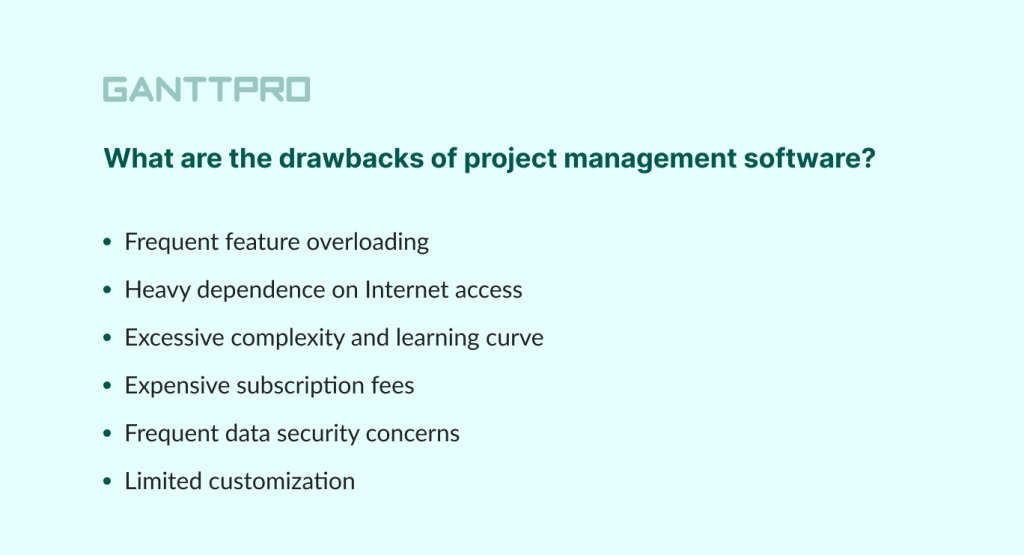
Credit: blog.ganttpro.com
Training And Onboarding
Project management tools can create challenges in training and onboarding. They often require extensive learning, increasing frustration for new users. Miscommunication may occur if team members misunderstand tool functionalities, leading to inefficiencies.
Training and onboarding are critical aspects of implementing any new project management tool. While these tools promise efficiency and productivity, they often come with a learning curve. Companies need to invest time and resources to ensure their teams are adequately trained to use these tools effectively.
Training Takes Time
Introducing a new project management tool isn't as simple as flipping a switch. It demands dedicated time to train your team, which can temporarily slow down operations. Imagine trying to learn a new language while juggling your everyday tasks. Wouldn't that feel overwhelming?
Varying Skill Levels
Not everyone on your team will have the same level of comfort with technology. Some might pick it up quickly, while others may struggle. This disparity can lead to frustration and inefficiencies, as team members may need varied amounts of support.
Resource Allocation
Training your staff requires resources—both human and financial. You might need to hire trainers or allocate your own team members to lead sessions. This can divert resources away from core business activities, affecting productivity.
Resistance To Change
Change is hard, especially when it involves altering the way people work. Some team members may resist adopting a new tool, preferring familiar methods. How do you plan to address this resistance and encourage adoption?
Keeping Up With Updates
Project management tools often come with regular updates and new features. Continuous learning is necessary to keep up with these changes. Are you prepared to invest in ongoing training to ensure your team stays up-to-date? Ultimately, while project management tools can be beneficial, the training and onboarding process can present significant challenges. It's crucial to weigh these disadvantages against the potential benefits to decide if it's the right move for your team.
Subscription Costs
Project management tools have become essential for keeping tasks organized, timelines intact, and teams efficient. However, they come with their own set of challenges, especially when it comes to subscription costs. These recurring fees can unexpectedly add up and might be a burden for small businesses or individual users.
Imagine setting up your dream project management tool, only to find out later that keeping it running smoothly requires a monthly payment. You might start questioning if the cost aligns with the value you’re receiving.
The Financial Burden
Subscription costs can be a financial strain. A tool that seemed affordable at first can quickly become a significant expense, especially when additional features require separate payments.
Consider a situation where you initially opt for a basic plan. As your business grows, you might need advanced features. Each upgrade means more money out of your pocket.
Hidden Charges
Beware of hidden charges. Some tools lure you in with a low base price, but once you're hooked, they reveal extra charges for essential features or integrations.
These hidden costs can be frustrating and might lead you to question the transparency of the service provider. Are you truly getting what you paid for?
Cost Vs. Benefit Analysis
It’s crucial to weigh the costs against the benefits. Are the features you’re paying for genuinely enhancing your productivity, or are they just nice-to-haves?
Conducting a cost vs. benefit analysis can help you make informed decisions. Consider whether you’re maximizing the tool’s potential or merely scratching the surface.
Alternatives And Flexibility
Are there more flexible options? Free or one-time payment tools might meet your needs without the recurring strain on your budget.
Exploring alternatives can be enlightening. Sometimes, simpler, low-cost options can be just as effective, saving you money in the long run.
Subscription costs can be a significant disadvantage if not managed wisely. Have you considered if your current tool is worth the investment?
Customization Expenses
Project management tools offer many benefits for businesses. But, they often come with hidden costs. One of the major expenses is customization. Customization is essential to fit a tool into a company's unique workflow. This process can become costly and time-consuming. Let's explore the various aspects of customization expenses.
Customization Complexity
Customization involves altering a tool to meet specific needs. This process is not always straightforward. It often requires expert intervention. Experts come with a price tag. The more complex the customization, the higher the cost.
Hidden Costs Of Custom Features
Custom features may seem appealing at first. But they often lead to hidden costs. These include additional training and support. Employees need to learn how to use these features. Training sessions and support calls add to expenses.
Time Investment
Customization is not only about money. It also demands time. The process of customizing a tool can be lengthy. This takes away valuable time from core business activities. Time spent on customization is time lost elsewhere.
Scalability Issues
Custom solutions can hinder scalability. As businesses grow, their needs change. Custom features may not adapt well to new requirements. This can result in further customization expenses down the line.
Vendor Dependence
Customizing a tool can lead to dependence on the vendor. Businesses might need constant support for updates and issues. This ongoing reliance can add to costs. Vendor support is usually not free.
Integration Challenges
Project management tools have revolutionized how teams collaborate. But with benefits come challenges. Integration issues often arise when adopting these tools. They can disrupt workflows and create obstacles for teams.
Compatibility Issues
Many tools struggle to work with existing systems. Teams use diverse software, making compatibility crucial. Not all tools support seamless integration. This can lead to inefficiencies and frustration.
Data Migration Problems
Transferring data between systems is tricky. Project management tools may fail to migrate data smoothly. Important details can be lost or corrupted. This disrupts operations and decision-making.
Technical Difficulties
Technical issues can hinder integration. Teams face challenges with APIs and connectivity. Time and resources are required to resolve these issues. This can slow down projects and lower productivity.
Training Needs
New tools require training for effective use. Teams must learn integration processes. Without proper training, errors and delays occur. Investing in training is necessary but can strain resources.
Increased Costs
Integration often brings hidden costs. Tools may need additional software or services. These costs can add up quickly. Budget constraints can impact tool adoption and integration efforts.
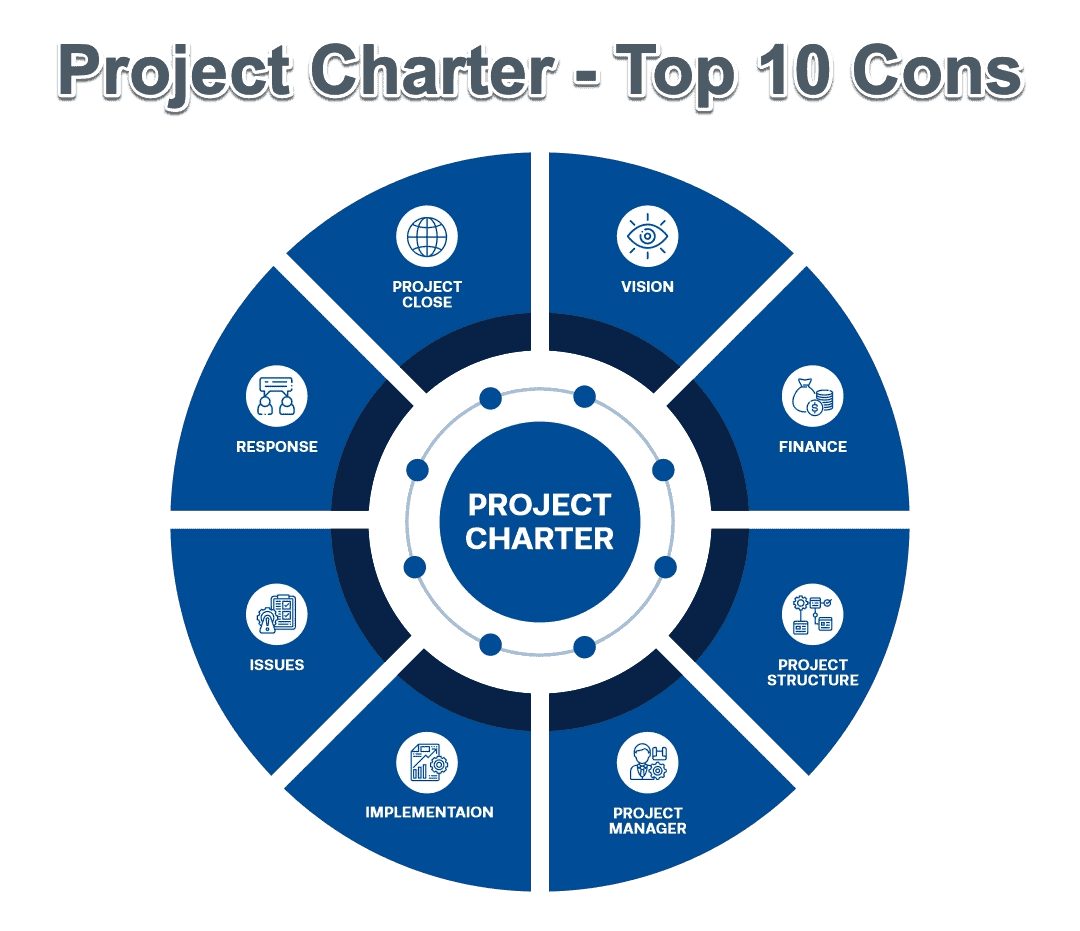
Credit: projectmanagers.net
Maintenance And Upgrades
Project management tools often require regular maintenance and upgrades. These tasks can be time-consuming and costly. Users may face challenges in adapting to new features, impacting efficiency and productivity.
Maintaining and upgrading project management tools can be a tricky business. They promise efficiency, but sometimes the hidden costs can overshadow their benefits. Have you ever felt the frustration of an unexpected software update disrupting your workflow? Or maybe you’ve experienced the pressure of keeping up with constant upgrades. Maintenance and upgrades aren’t just about keeping software running smoothly; they demand time, money, and focus—resources you might prefer to allocate elsewhere.
Unexpected Costs
The allure of project management tools often lies in their initial promise of streamlining tasks. But what happens when unforeseen expenses start creeping in? Frequent upgrades can mean additional costs for new features or increased subscription fees. You might find yourself in a cycle of spending more than anticipated. Is your budget ready to handle these surprises?
Time And Resource Drain
Every upgrade requires time—a commodity that’s already scarce in project management. You need to schedule downtime for installations and training sessions. This can disrupt your team’s productivity, especially if the updates are frequent. Have you ever paused to consider how much time is actually spent managing the tool itself?
Compatibility Issues
Not all upgrades are smooth. Sometimes, they lead to compatibility issues with existing systems, creating more problems than solutions. Imagine the frustration when a new update makes your current processes obsolete. Are you prepared to deal with potential conflicts between old and new systems?
Learning Curve
Each upgrade often brings new features that require learning and adaptation. This can be a steep curve, especially for team members who are already juggling multiple tasks. Are you willing to invest in additional training to ensure everyone is on the same page?
Reliance On External Support
With constant upgrades, you might find yourself increasingly reliant on external support. This dependency can be costly and time-consuming. It begs the question: is your team equipped to handle technical issues independently, or are you constantly reaching out for help? Thinking about these aspects might make you wonder if these tools are worth the hassle. Are you getting the value you expect from them, or is it time to reconsider your approach? Balancing the benefits and disadvantages of project management tools is crucial for maintaining efficiency without breaking the bank or your team’s spirit.
Limited Flexibility
Project management tools promise efficiency and streamlined workflows. Yet, they often lack flexibility. This rigidity can be a significant drawback. Users find themselves locked into specific processes. These tools rarely accommodate unique project needs. Thus, many feel constrained by their limitations.
Limited Customization Options
Most project management tools offer predefined settings. Users can't easily alter these to fit specific requirements. This limits personalization and adaptability. Teams struggle to tailor workflows to their needs. As a result, productivity may suffer.
Rigid Task Structures
Tasks are often defined in fixed formats. This restricts how users can organize their projects. Creativity in task management gets stifled. Teams must adapt to the tool's format. This can lead to frustration and inefficiency.
Difficulty In Integrating Unique Processes
Every project has unique processes. Project management tools often fail to support these. Users must conform to preset workflows. This makes it hard to incorporate specific business practices. Teams may find themselves losing their unique edge.
Challenges With Scaling
As businesses grow, their needs change. Project management tools may not scale easily. Limited flexibility can hinder growth. Teams may struggle with evolving demands. Tools may not adapt to larger projects.
Over-reliance On Tools
In today's digital age, project management tools are essential. They streamline tasks and enhance productivity. Yet, there's a potential pitfall: over-reliance on these tools. Many teams depend heavily on them, risking inefficiencies. This dependence can hinder decision-making and stifle creativity. Let's explore the drawbacks of over-relying on project management tools.
1. Limited Critical Thinking
Excessive use of tools might reduce critical thinking skills. Team members may rely on automated features for decision-making. This can lead to a lack of problem-solving abilities. Critical thinking is vital for overcoming unexpected challenges. Without it, projects can falter when facing unforeseen issues.
2. Communication Breakdown
Project management tools often replace face-to-face communication. Over-reliance can result in misunderstandings and miscommunication. Important nuances may get lost in digital communication. Team members might miss out on valuable insights shared in person.
3. Decreased Flexibility
Tools may encourage rigid adherence to processes. This can reduce flexibility in adapting to project changes. Team members might become less willing to adapt to new methods. A lack of flexibility can slow down project progress and innovation.
4. Overlooked Human Elements
Tools can't capture every human element involved in projects. Emotional intelligence and interpersonal skills are crucial in team dynamics. Over-reliance on tools can lead to neglecting these human aspects. This oversight might affect team morale and collaboration.
5. Risk Of Tool Dependency
Heavy reliance can create dependency on a specific tool. If the tool fails or becomes outdated, the team may struggle. Adapting to a new tool can be time-consuming and disruptive. This dependency poses a risk to project continuity.
Security Concerns
Project management tools streamline workflows. But they also present security risks. Protecting sensitive data becomes a challenge. Unauthorized access, data breaches, and cyber threats are real dangers. Users must be aware of these issues.
Data Breaches
Data breaches can occur at any time. Hackers target project management tools for valuable information. They seek sensitive client details and confidential documents. A breach can damage trust and reputation.
Unauthorized Access
Unauthorized access is another major concern. Weak passwords and shared credentials contribute to this risk. Employees might inadvertently share sensitive information with unauthorized users. Regular audits and access controls help mitigate this risk.
Data Encryption
Data encryption is crucial for security. Some project management tools lack strong encryption protocols. This makes data vulnerable during transmission. Always choose tools with robust encryption standards to ensure data safety.
Third-party Integrations
Many tools offer third-party integrations for enhanced functionality. These can expose systems to additional security risks. Not all third-party apps prioritize security. Evaluate integrations carefully before enabling them.
Compliance Issues
Compliance with data protection laws is essential. Project management tools must align with regulations like GDPR. Failure to comply can lead to hefty fines. Ensure tools meet legal standards to avoid penalties.
Data Migration Issues
Migrating data using project management tools can lead to unexpected issues. Tools might not handle large data volumes efficiently, causing slow performance and potential data loss. Compatibility problems between different systems can also arise, leading to frustration and delays.
Switching to a new project management tool can seem like a fresh start, promising better organization and efficiency. However, the transition isn't always smooth, particularly when it involves migrating data from one system to another. Data migration issues can become a significant roadblock, causing frustration and delays in your workflow. You might find yourself dealing with lost information or corrupted files, leading to a chaotic situation rather than the streamlined process you envisioned.
Data Compatibility Challenges
Not all project management tools speak the same language. You may experience compatibility issues between your old and new systems. This can result in important data not transferring correctly. Missing fields or broken formats can disrupt your projects. Imagine planning a campaign and realizing key details didn't migrate. It's crucial to ensure your new tool can handle your existing data structure.
Time-consuming Process
Migrating data isn't a quick task. It requires careful planning and execution. You might spend hours—or even days—transferring information. This can pull you away from your core tasks and impact productivity. Have you ever found yourself stuck in a data migration marathon, wondering when you'll finally get back to your real work? It's essential to weigh the time investment against the benefits before making the switch.
Risk Of Data Loss
There's always a risk of losing data during migration. Important files can disappear or become corrupted. This can lead to gaps in project history and hinder decision-making. Have you ever tried to recover lost data and ended up feeling helpless? It's a reminder to always back up your information. Make sure you have a reliable backup system in place before starting the migration process.
Training And Adjustment Period
Switching tools means learning new interfaces and functionalities. Your team will need time to adjust. Training sessions can help, but they add to the workload. Have you ever faced resistance from team members unwilling to learn a new system? It's important to communicate the benefits clearly. Encourage them by highlighting features that improve efficiency and collaboration.
Hidden Costs
Data migration might come with unexpected expenses. You may need to invest in additional software or support services. These hidden costs can strain your budget. Have you ever been surprised by an unexpected bill after migrating data? Scrutinize the costs involved before committing. It's better to be prepared than to be caught off guard. Switching project management tools is a major decision. Understanding data migration issues can help you plan better. By addressing potential challenges ahead of time, you can ensure a smoother transition for your team and projects. Are you ready to tackle these obstacles head-on and make an informed choice?
Credit: www.aceproject.com
Frequently Asked Questions
What Are The Disadvantages Of Using Project Management Tools?
Project management tools can be costly. They may require training and lead to dependency. Complexity might confuse users, reducing efficiency. Data security issues can arise. Integration with existing systems may be challenging.
What Are The Advantages And Disadvantages Of Using Tools?
Tools enhance efficiency, accuracy, and productivity. They simplify complex tasks and save time. Some tools require training or investment. Over-reliance may hinder skill development.
What Are Some Of The Disadvantages Of Pm Methods?
Project management methods can be rigid, limiting flexibility. They may increase costs due to extensive documentation. Some methods can be overly complex, causing confusion. They might not suit all project types, leading to inefficiencies. Team members may resist adhering to structured processes, affecting productivity.
What Are The Two Common Problems In Project Management?
Two common problems in project management are poor communication and inadequate resource management. Poor communication leads to misunderstandings and delays. Inadequate resource management results in missed deadlines and budget overruns. Effective planning and clear communication can help mitigate these issues, ensuring project success.
Conclusion
Project management tools have their downsides. They can be costly. Training takes time and effort. Not all team members adapt easily. Technical issues can disrupt workflow. Over-reliance might reduce personal communication. Some tools lack customization options. Security concerns can arise with data storage.
Choosing the right tool is challenging. Careful consideration is essential before implementation. Balance the benefits against these drawbacks. Ensure the tool fits your team’s needs. Understanding limitations helps in better decision-making. Use tools wisely for effective project management. Stay informed and make smart choices.
Success depends on how you use these tools.