
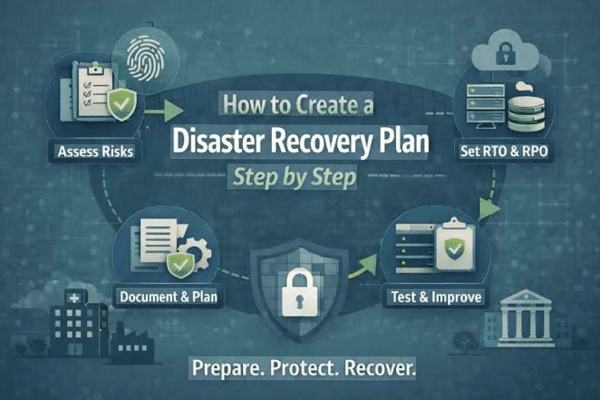
A disaster recovery plan helps you bounce back fast from outages and loss.
If you are new to this topic, you are in the right place. This beginner guide to disaster recovery planning will walk you through clear steps, tools, and examples that I use with real teams. I will show you how to cut downtime, protect data, and build trust with simple, proven methods. Stick with me, and you will leave with a plan you can put to work today.
Disaster recovery in plain English
Disaster recovery is how you restore systems and data after a bad event. Think fires, floods, ransomware, or a cloud region outage. Business continuity keeps work going. Disaster recovery gets tech back up.
You need both. But this beginner guide to disaster recovery planning focuses on the tech steps to recover fast. We will work from risk to runbooks to tests.

Key terms you must know
Recovery Time Objective (RTO) is how long you can be down. Recovery Point Objective (RPO) is how much data you can lose. Both are set by the business, not by tools.
A Business Impact Analysis (BIA) ranks what is critical. A hot site is ready to run now. A warm site needs some setup. A cold site is bare. These terms show up often in any beginner guide to disaster recovery planning.
Beginner guide to disaster recovery planning: step-by-step
-
List your risks
- Think storms, fires, power, network, insider threats, ransomware, and cloud region loss.
- Use simple what-if notes. Keep it short and real.
-
Do a quick BIA
- Rank apps by impact on money, people, and laws.
- Set clear RTO and RPO for each app.
-
Map dependencies
- Note data stores, queues, DNS, identity, and third parties.
- Draw a simple map. If it is not on paper, it will break in failover.
-
Choose a recovery strategy
- Backups only for low risk apps.
- Replication and failover for high risk apps.
- Match the plan to your RTO and RPO.
-
Design your backup plan
- Use the 3-2-1 rule: three copies, two media, one offsite.
- Add immutability and versioning to block ransomware.
-
Plan environments
- Hot or warm site in another zone or region.
- Use infrastructure as code for fast rebuilds.
-
Write runbooks
- One page per app. Clear steps. Screens, commands, and who to call.
- Add rollback steps. Add a test note at the end.
-
Set roles and contacts
- Name the incident lead, comms lead, and tech owners.
- Keep contact info in two places, on and off the network.
-
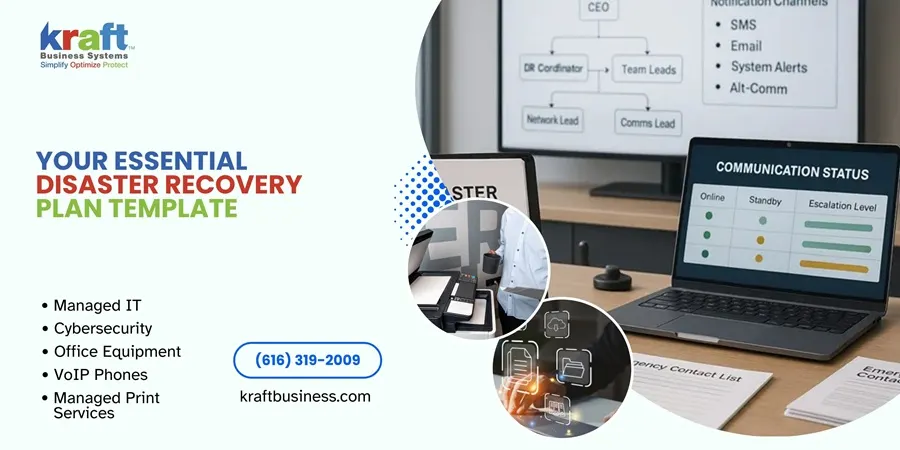
Build the comms plan
- Who alerts whom, on what channel, with what template.
- Include legal, PR, and customer notes. Keep it simple and calm.
-
Test small, then big
- Start with walk-throughs. Then do tabletop drills.
- Move to live failover in a low-risk window.
-
Track gaps and fix them
- Log issues and actions.
- Update runbooks and code after each test.
-
Review each quarter
- Update RTO, RPO, and contacts.
- Tie the plan to new apps and changes.
Use these steps as your living beginner guide to disaster recovery planning. Print it, share it, and run it.
Practical examples and scenarios
Ransomware hits a file server. You switch to clean snapshots from last night. You restore to a safe network. You rotate keys and check logs for spread. Your RPO was one hour, so add more frequent snaps next time.
A cloud region goes down. DNS sends users to a warm site in another region. Data uses async replication. You accept a small data lag for an hour. This shows why the beginner guide to disaster recovery planning must include DNS, cache, and auth.
A bad script drops a table. You stop writes. You restore from point-in-time backup. You replay safe logs to a clean point. You add a change gate to stop it next time.

Tools, backups, and cloud choices
Backups are your safety net. Go with image-level and file-level backups for key systems. Add database native backups and point-in-time restore. Keep one copy offsite and one copy immutable.
Replication cuts RTO and RPO. Use cross-zone or cross-region. Know the cost and the data law rules. Failover needs health checks, DNS change, and a clear runbook.
Use code to build infra. Templates let you rebuild fast in a clean zone. This fits the beginner guide to disaster recovery planning because it lowers stress when things break.

Testing, training, and updates
There are four levels of tests. Walk-throughs check logic. Tabletop drills run the story with people. Sim tests try parts in a lab. Live failovers switch real traffic in a safe window.
Run small tests each month. Run a full test each quarter. Rotate on-call roles so new staff learn. Track time to recover, data loss, and steps missed.
Turn tests into stories. Share what worked. Share what did not. That is how a beginner guide to disaster recovery planning becomes a team habit, not a file on a shelf.

Common mistakes and lessons I learned
I once saw a team that had perfect backups but no restore tests. In the real event, the backup tool needed a license server that was down. We fixed it by testing restores each week and exporting license keys offline.
Another time, a warm site had apps but no API keys. Failover took hours. Now I store secrets in a vault that can work in both sites. This is why the beginner guide to disaster recovery planning must cover people, keys, and comms, not just servers.
Do not aim for zero risk on day one. Start small. Protect the top three apps first. Ship value fast and build from there.

Compliance, risk, and cost
Some rules may apply to you. Think ISO 22301 for continuity, NIST SP 800-34 for federal DR, SOC 2, HIPAA, and GDPR. Map your plan to the controls. Keep proof of tests and fixes.
Do a light risk matrix. Score impact and chance. Spend where the score is high. Show leaders a clear link from RTO and RPO to cost.
Cyber insurance may ask for MFA, offsite backups, and tests. This beginner guide to disaster recovery planning helps you meet those asks and cut premiums over time.

Metrics and reporting
Pick a few KPIs and keep them steady:
- Recovery Time vs RTO: average and worst case.
- Recovery Point vs RPO: data loss in minutes.
- Test pass rate: by system and by quarter.
- Coverage: percent of tier-1 apps with runbooks and tests.
- Mean time to detect and respond.
Share a one-page report with trends and actions. Use it to win budget and to guide the next round of fixes in your beginner guide to disaster recovery planning.
Templates and checklists you can copy
Use this simple template for each app:
- App name, owner, and contacts.
- RTO and RPO, with reason.
- Dependencies: data, auth, DNS, third parties.
- Backups: type, place, schedule, retention, test plan.
- Failover: site, steps, health checks, rollback.
- Runbook: step list, screenshots, commands, and time goals.
- Test log: dates, results, gaps, actions.
Checklist for quarterly review:
- Contacts and roles updated.
- Backups tested and restore time logged.
- Changes in infra reflected in runbooks.
- Risks reviewed and scores updated.
- Comms templates tested.
Keep the template short. A clear page beats a thick binder. That is the spirit of this beginner guide to disaster recovery planning.
Frequently Asked Questions of beginner guide to disaster recovery planning
What is the first step in disaster recovery planning?
Start with a simple Business Impact Analysis. It tells you what matters, how fast it must come back, and how much data you can lose.
How often should I test my disaster recovery plan?
Run small tests each month and a full test each quarter. After each test, log gaps and fix them fast.
Do I need a hot site to be safe?
No. Match the site type to your RTO and RPO. Many apps do well with backups and a warm site.
How does disaster recovery differ from business continuity?
Disaster recovery restores tech and data. Business continuity keeps core work going with backups like people, sites, and vendors.
What budget should I plan for disaster recovery?
Tie spend to risk and impact. Start with backups, then add replication for top apps, and grow as you learn.
How do I handle third-party SaaS in my plan?
Ask for their RTO, RPO, and uptime history. Build a workaround in case the vendor is down.
Is cloud disaster recovery enough on its own?
Cloud helps, but you still need backups, tests, and a runbook. Regions fail and accounts get locked, so plan for that.
Conclusion
You now have a clear path to build, test, and grow a real plan. Start with the top three apps, set RTO and RPO, write one-page runbooks, and run a small test this month. Each step will cut risk and boost trust.
Put this beginner guide to disaster recovery planning into action today. Share it with your team, book your first test, and keep improving. Want more guides and checklists? Subscribe, ask a question, or leave a comment with your next challenge.



