

A border firewall is a security gateway placed at your network’s internet edge.
If you want a clear, expert-backed border firewall definition and practical steps to use one well, you are in the right place. I have deployed and tuned firewalls for startups and large enterprises, and I’ll break down what works, what fails, and what to watch. Keep reading for a complete border firewall definition, real examples, and a simple plan you can apply today.
What a border firewall is and why it matters
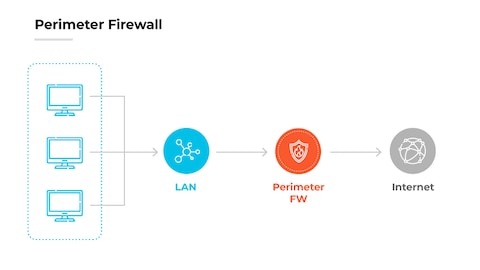
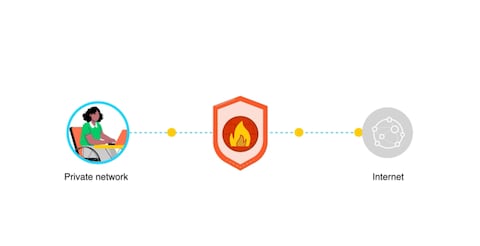
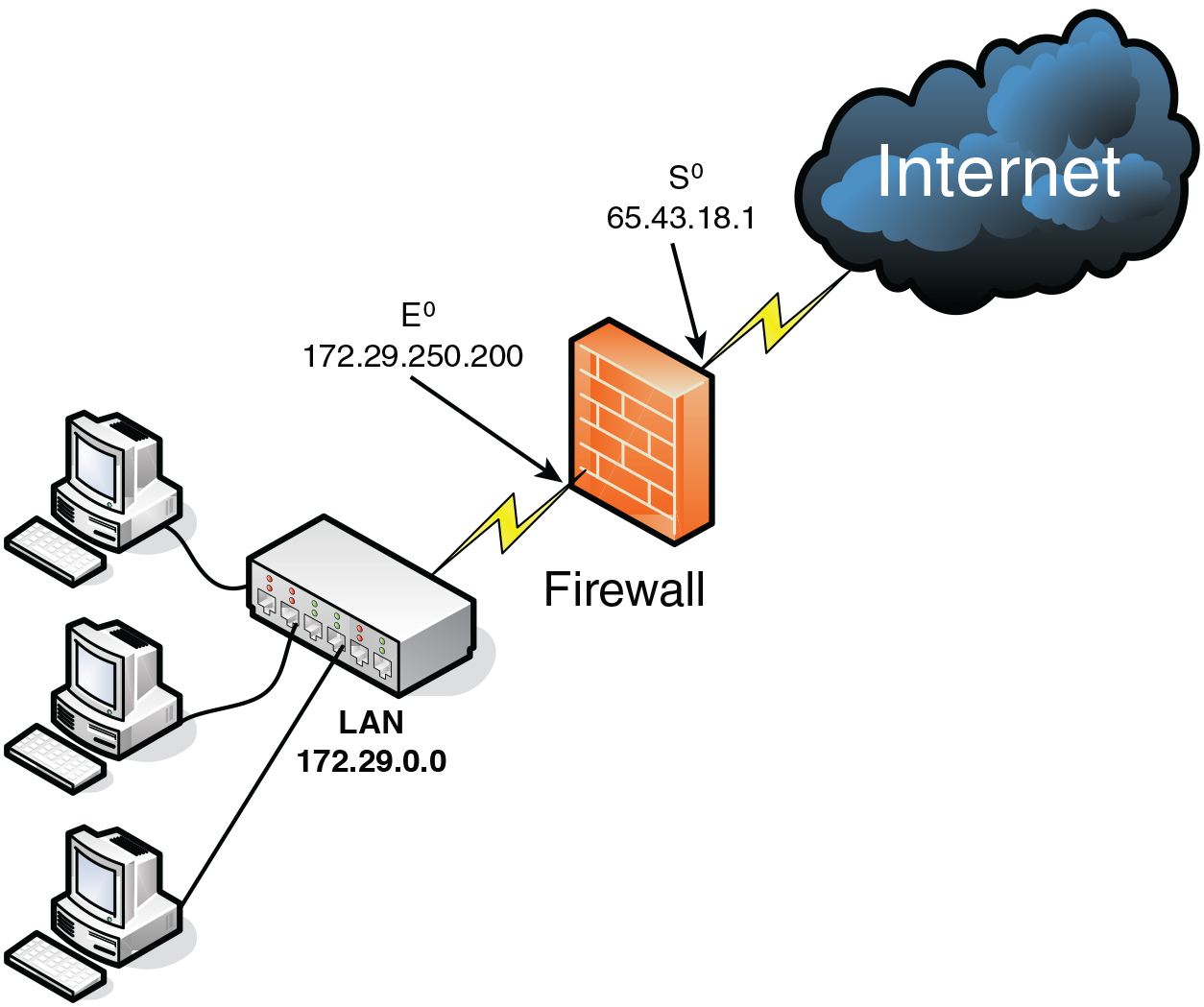
A border firewall sits where your private network meets the public internet. It filters, inspects, and controls traffic between these worlds. Think of it like a customs gate that checks IDs and bags before entry. This is the simplest way to hold the line against common threats.
When people search for a border firewall definition, they want more than a textbook line. They want to know how it protects data, apps, and people. They also want to know how it fits with zero trust and cloud. The short answer is that it is still the first guard, but not the only one.
I like to frame the border firewall definition in one sentence. It is a policy-driven gateway that allows known-good traffic and blocks everything else. It gives you visibility, control, and a record of what crossed the edge. That record matters when you investigate a breach.

How a border firewall works
A border firewall checks network packets and sessions as they enter or leave your network. It compares traffic to rules that you create. If traffic matches an allow rule, it passes. If not, it is blocked or logged.
Modern firewalls do more than simple checks. They track sessions, decode apps, inspect encrypted flows, and look for threats. They can also do network address translation so inside hosts stay private. This is core to any useful border firewall definition.
Good designs use zones, VLANs, and a DMZ to segment risk. Public-facing services live in the DMZ. Internal systems sit behind another policy layer. Remote users connect through VPNs that the firewall terminates and inspects.
Types and architectures
Border firewalls come in many forms. The best choice depends on your size, risk, and budget. Here is how I frame the options:
- Hardware appliances. Reliable and fast for on‑prem sites and branches. Easy to place in a rack with redundant power.
- Virtual firewalls. Run in VMware, Hyper‑V, or KVM. Great for data centers and labs. Scale up or down fast.
- Cloud-native firewalls. Deploy in AWS, Azure, or Google Cloud. Integrate with cloud routing and security groups.
- Managed next‑gen firewalls. Vendors host and manage policy and updates. Good for small teams.
- SASE or SSE platforms with firewall functions. Extend the edge to users anywhere. Useful when offices are optional.
Each model still fits the same border firewall definition. It is the policy gate at the edge, even when the edge is in the cloud or follows your users on the road.
 features and capabilities"
style="max-width: 100%; height: auto; border: 2px solid black; border-radius: 10px; display: block; margin: 0 auto;"
loading="lazy"
/>
Key features and capabilities
When I assess products, I look for a tight core set of features. They should map to the border firewall definition and reduce risk with clear value.
- Access control lists with app awareness. Allow only the apps and ports you need. Block the rest.
- Stateful inspection. Track sessions so return traffic is allowed only if it is part of a valid flow.
- NAT and PAT. Hide internal addresses and reduce attack surface. Keep routing simple.
- Intrusion prevention. Detect and stop known exploits in real time. Update signatures often.
- TLS inspection with care. See inside encrypted flows where allowed by policy and law.
- DNS and web filtering. Block malware domains, phishing, and risky categories.
- VPN termination. Support site-to-site and remote user access with strong auth.
- Advanced routing. Handle static routes, dynamic protocols, and equal-cost paths.
- Logging and SIEM export. Send detailed logs to a central system for search and alerts.
- High availability. Support active/standby or active/active pairs to avoid downtime.
A vendor can add many nice extras. But if these basics are weak, the tool will not meet the real needs in any border firewall definition.

Best practices and deployment checklist
Here is the simple plan I use. It is based on hard lessons and success in the field.
- Define the edge. List every internet link, cloud VPC, and partner connection. Your border firewall definition is only as clear as your map.
- Start with default deny. Allow only the traffic you need for business use. This trims noise and risk fast.
- Use meaningful objects. Group hosts, subnets, and apps so rules are readable. This reduces errors.
- Build from least privilege. Permit only the source, destination, and service needed. Nothing extra.
- Segment with zones and a DMZ. Place public apps in a buffer network. Keep internal systems behind another layer.
- Enable logging on every rule. Tag rules by owner and purpose. Ship logs to a SIEM.
- Roll out in stages. Use a test policy, then monitor, then enforce. Keep a backout plan.
- Review rules monthly. Remove unused entries. Merge overlaps. This keeps the policy clean.
- Patch and update often. Keep firmware and signatures current. Schedule change windows.
- Test failover. Simulate link loss and firewall fail events. Fix gaps before users feel them.
These steps make the border firewall definition real in daily work. They also help you pass audits with less pain.

Common mistakes and troubleshooting
I often see teams allow broad rules to fix a quick issue. Months later, that rule hides a breach path. Do not trade speed for safety. Use temporary rules with auto-expiry.
Another mistake is blind TLS. Many attacks hide in encrypted traffic. Plan lawful, scoped TLS inspection where it adds value. Exclude sensitive apps like banking or health records if required.
For troubleshooting, keep it simple. Check routing, NAT, and rule order first. Use packet capture on the firewall. Trace one flow end to end. This approach aligns with a practical border firewall definition that values clarity and control.
Use cases and real-world examples
Small businesses often start with one appliance at the ISP handoff. They use a few allow rules, NAT, and a remote access VPN. This setup fits the classic border firewall definition and covers most needs.
Enterprises may run pairs of firewalls per data center with dynamic routing. They split internet egress by region. They add IPS, TLS inspection, and DDoS controls. I helped one firm cut malware callbacks by 80% by blocking new domains at the edge.
Hybrid teams push the edge to the cloud. A virtual firewall in each VPC enforces east-west and north-south rules. Identity-based policies follow users. The border firewall definition expands here, but the mission stays the same: trust by policy, not by default.
Measuring effectiveness and KPIs
If you cannot measure, you cannot improve. Pick simple metrics that match your goals.
- Policy hygiene. Count unused rules and objects. Drive that number down.
- Coverage. Percent of internet egress that passes through the firewall. Aim for full coverage.
- Time to update. Hours from patch release to deploy. Shorter is safer.
- Threat stops. Confirmed blocked exploits and callbacks per month. Watch trend lines.
- Latency impact. Milliseconds added for key apps. Keep user experience smooth.
- Incident dwell time. Minutes from alert to triage. Faster response lowers risk.
These measures give life to any border firewall definition by turning it into action.
Compliance and governance
Many standards expect a strong edge control. Clear policies, logs, and reviews are key. Map rules to business needs. Prove it with change records and owner tags.
Keep logs long enough to support audits and forensics. Monitor access to the firewall itself with strong admin controls. Document exceptions with a time limit. All of this backs a trustworthy border firewall definition that stands up under review.
Frequently Asked Questions of border firewall definition
What is the simplest border firewall definition?
It is a secure gateway at your internet edge that filters traffic by policy. It allows known-good traffic and blocks or logs everything else.
How is a border firewall different from an internal firewall?
A border firewall sits at the network edge, facing the internet. An internal firewall sits between internal segments to reduce lateral movement.
Do I still need a border firewall if I use zero trust?
Yes. Zero trust adds identity and device checks, but you still need edge control. The border firewall reduces exposure and stops basic attacks.
Can a cloud environment use a border firewall?
Yes. You can deploy a virtual or cloud-native firewall in each VPC or VNet. It plays the same role at the cloud edge.
What rules should I start with?
Use default deny, then allow only required apps and ports. Add DNS, NTP, web access, and your public services, all with logging.
Does TLS inspection belong in a border firewall?
Often, yes, but scope it. Inspect where lawful and needed, and exempt sensitive services to protect privacy.
How often should I review firewall rules?
Review monthly and after major changes. Remove unused rules and tighten broad entries.
Conclusion
A strong edge makes every other control work better. With a clear border firewall definition, you can design simple policies, block real threats, and keep users happy. Start with default deny, segment with zones, log everything, and review often.
Take one action today: audit your top 20 rules and tag each with an owner and purpose. Then plan a monthly cleanup. Want more guides like this? Subscribe, share your questions, or leave a comment with your current edge setup.



