

After the first user authenticates on a non-secure network, attackers can hijack sessions fast.
I have seen this moment act like a door left ajar. One careless login on open Wi‑Fi can expose cookies, tokens, and even downstream systems. In this guide, we will unpack what really happens after the first user authenticates on a non-secure network, why it matters, and how to protect your team. I will share field-tested tactics, simple checks, and modern patterns that raise your security baseline without blocking work.
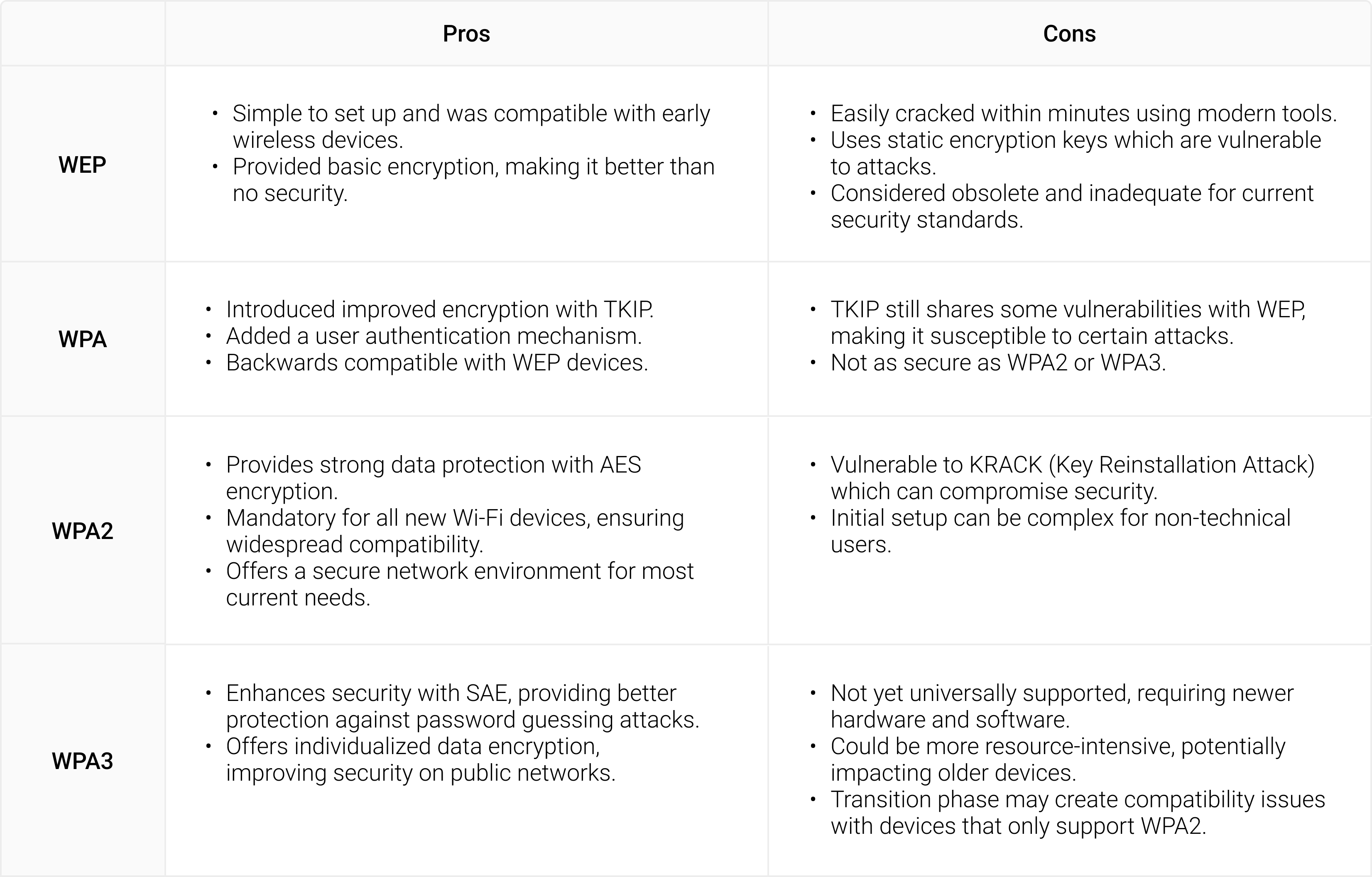
What Really Happens After the First User Authenticates on a Non-Secure Network
After the first user authenticates on a non-secure network, the risk curve bends upward. The attacker watches the wire. They look for credentials, tokens, and redirects. They wait for a small mistake to turn into a big problem.
A successful login produces value. That value is a session. On weak or open Wi‑Fi, session data can be exposed or tricked into downgrade paths. After the first user authenticates on a non-secure network, any leak can allow replay, token theft, or privileged pivot.
The attacker does not need admin rights at first. They only need a foothold. With a hijacked session, they explore inboxes, docs, and internal apps. They then move sideways. Soon, they look like you.
Common Attack Paths on Open and Weak Wi‑Fi
After the first user authenticates on a non-secure network, several attack paths open. Most of them are quiet. Many ride on normal traffic.
Session hijacking and cookie theft
Attackers watch for cookies and tokens if encryption is weak or misused. They can grab tokens from non‑HSTS sites or from apps with mixed content. Once stolen, they skip the login and act as the user.
Credential replay and password sprays
Some captive portals log credentials in clear text. Attackers collect them and test them on email or cloud apps. If you reuse passwords, the blast radius grows.
Evil twin hotspots and captive portal phishing
An attacker clones a known SSID. The portal looks legit. Users enter passwords or approve MFA prompts. The attacker harvests secrets and pushes malware.
SSL stripping and downgrade attacks
Insecure redirects let attackers force HTTP before HTTPS. This strips protection and reveals session data. Lack of HSTS and weak TLS settings make this worse.
ARP spoofing, DNS poisoning, and lateral movement
Fake ARP replies let attackers sit in the middle. Poisoned DNS sends users to fake login pages. They capture tokens and plant backdoors for later use.
Business Impacts and Real-World Stories
In a past audit, a single login at an airport lounge kicked off a week of cleanup. The user hit a fake captive portal. Tokens were lifted. The attacker used the email session to reset other app passwords and set mailbox rules to hide alerts.
After the first user authenticates on a non-secure network, small leaks become business risks. You can face data loss, fraud, or brand damage. You can also trip legal or audit issues. Recovery often costs more than prevention.
Teams also lose time and trust. People blame tools or rules. Clear steps and better defaults help stop this cycle.
How to Reduce Risk Before, During, and After Login
After the first user authenticates on a non-secure network, controls must work as a system. Aim for defense in depth that feels light.
Before login: network hygiene and device posture
- Use managed DNS with filtering to block known bad hosts.
- Enforce device updates and endpoint protection with strong defaults.
- Install a reputable, auto‑connect VPN client with split tunneling rules.
- Train users to avoid open SSIDs and to hotspot from mobile when in doubt.
During login: strong auth and channel protection
- Enforce HTTPS with HSTS and redirect HTTP to HTTPS at the edge.
- Use phishing‑resistant MFA with device binding when possible.
- Prefer SSO with modern protocols and secure redirect URIs.
- Use certificate pinning in mobile apps to stop fake certs.
After login: session defense and monitoring
- Set short‑lived tokens with continuous re‑auth for risky contexts.
- Bind sessions to device posture and network risk score.
- Monitor for token reuse from new locations and flag it fast.
- Log all auth events and send them to your SIEM for alerts.
After the first user authenticates on a non-secure network, these guardrails limit blast radius. You can spot odd behavior early and act fast.
Architecture Patterns That Actually Work
You do not need a perfect network. You need strong edges and smart checks. Focus on the app layer and identity.
- Zero Trust access. Validate user, device, and context on each request. Do not trust the Wi‑Fi.
- TLS done right. Use modern ciphers, HSTS, and OCSP stapling. Block mixed content.
- Phishing‑resistant MFA. Use passkeys or hardware security keys where you can.
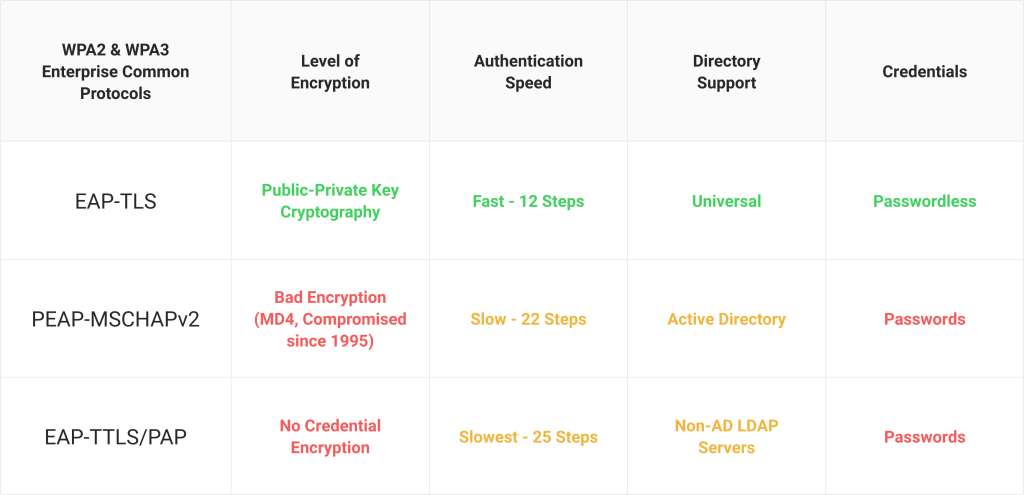
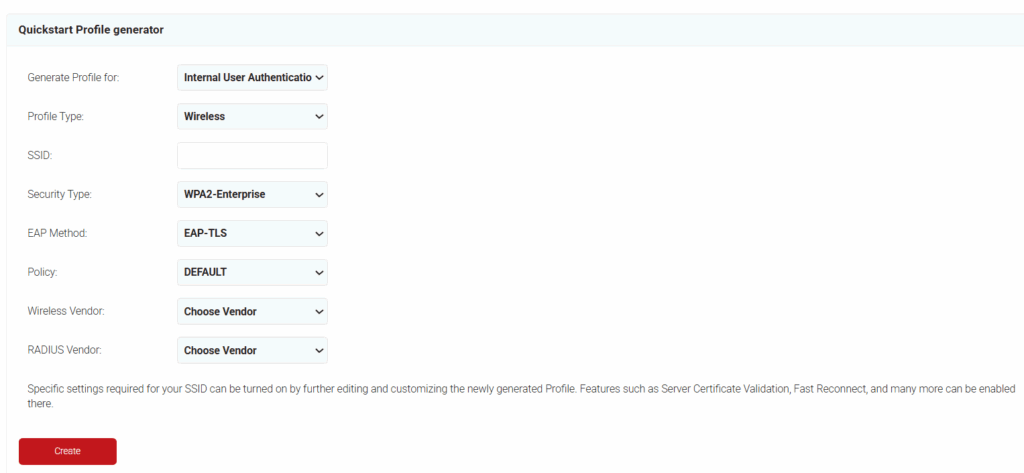
- EAP‑TLS or WPA3‑Enterprise. Use device certs for Wi‑Fi auth. Avoid shared passwords.
- Per‑app VPN or secure web gateways. Route only app traffic that needs protection.
- Token best practices. Use short‑lived access tokens and rotate refresh tokens on use.
After the first user authenticates on a non-secure network, these patterns keep secrets sealed. They make the network less special and the identity layer king.

Playbooks and Checklists for Teams
Build playbooks that are clear and short. Keep them where people will use them. Practice them.
-
Detection signals to watch
- New session from a new country minutes after a local login.
- User agent jumps from mobile to desktop in one minute.
- Unusual OAuth grants or consent prompts during travel.
-
First response steps
- Revoke tokens for the user and force re‑auth.
- Reset passwords and require phishing‑resistant MFA.
- Review mailbox rules and OAuth app grants.
- Scan the device and rotate app secrets if needed.
-
User coaching moments
- Use a mobile hotspot instead of open Wi‑Fi.
- Check for HTTPS and lock icons, but trust your VPN more.
- Do not approve surprise MFA prompts. Report them.
After the first user authenticates on a non-secure network, a crisp playbook cuts noise. It turns panic into action.
Metrics and Testing
You cannot fix what you do not measure. Pick a few metrics that matter and test often.
-
Key metrics
- Percent of logins protected by phishing‑resistant MFA.
- Median token lifetime and session reuse alerts.
- Time to revoke tokens after an incident is flagged.
- Share of devices on current OS and patch levels.
-
Tests to run
- Simulate an evil twin and confirm your VPN auto‑connects.
- Attempt SSL stripping in a test lab and verify HSTS works.
- Red team a fake captive portal and measure user responses.
- Tabletop a session hijack and practice revocation steps.
After the first user authenticates on a non-secure network, good tests prove if your controls hold. Adjust, retest, and keep it simple.
Frequently Asked Questions
What is the biggest risk after the first user authenticates on a non-secure network?
The biggest risk is session hijacking. An attacker may steal tokens and act as the user without knowing the password.
Does a VPN fully solve the problem?
A VPN helps a lot, but it is not magic. You still need MFA, HSTS, device checks, and alerting.
How can small teams protect themselves without big budgets?
Use built‑in security from your identity provider and browser. Enforce MFA, HSTS, updates, and a trusted DNS resolver.
Are public coffee shop networks always unsafe?
They are often risky because you do not control them. Treat them as untrusted and use a hotspot or VPN.
What should I do if I suspect a hijacked session?
Revoke all tokens for that account and require a new login. Reset the password, check mailbox rules, and scan the device.
Why emphasize short‑lived tokens?
Short‑lived tokens shrink the window attackers can use stolen sessions. They also force re‑checks of device and context.
Can passkeys help on non-secure networks?
Yes. Passkeys resist phishing and replay. They limit the value of credential theft on open Wi‑Fi.
Conclusion
One risky login can open the door. After the first user authenticates on a non-secure network, strong identity and session practices make the difference between a scare and a breach. Focus on HTTPS everywhere, phishing‑resistant MFA, short‑lived tokens, and automatic VPNs. Build a small playbook and drill it.
Take one step today. Enable HSTS, shorten token lifetimes, or roll out auto‑connect VPN. Share this guide with your team, subscribe for more hands‑on security tips, and tell me what works for you.



