

Collect, centralize, and review database logs with clear policies and alerts.
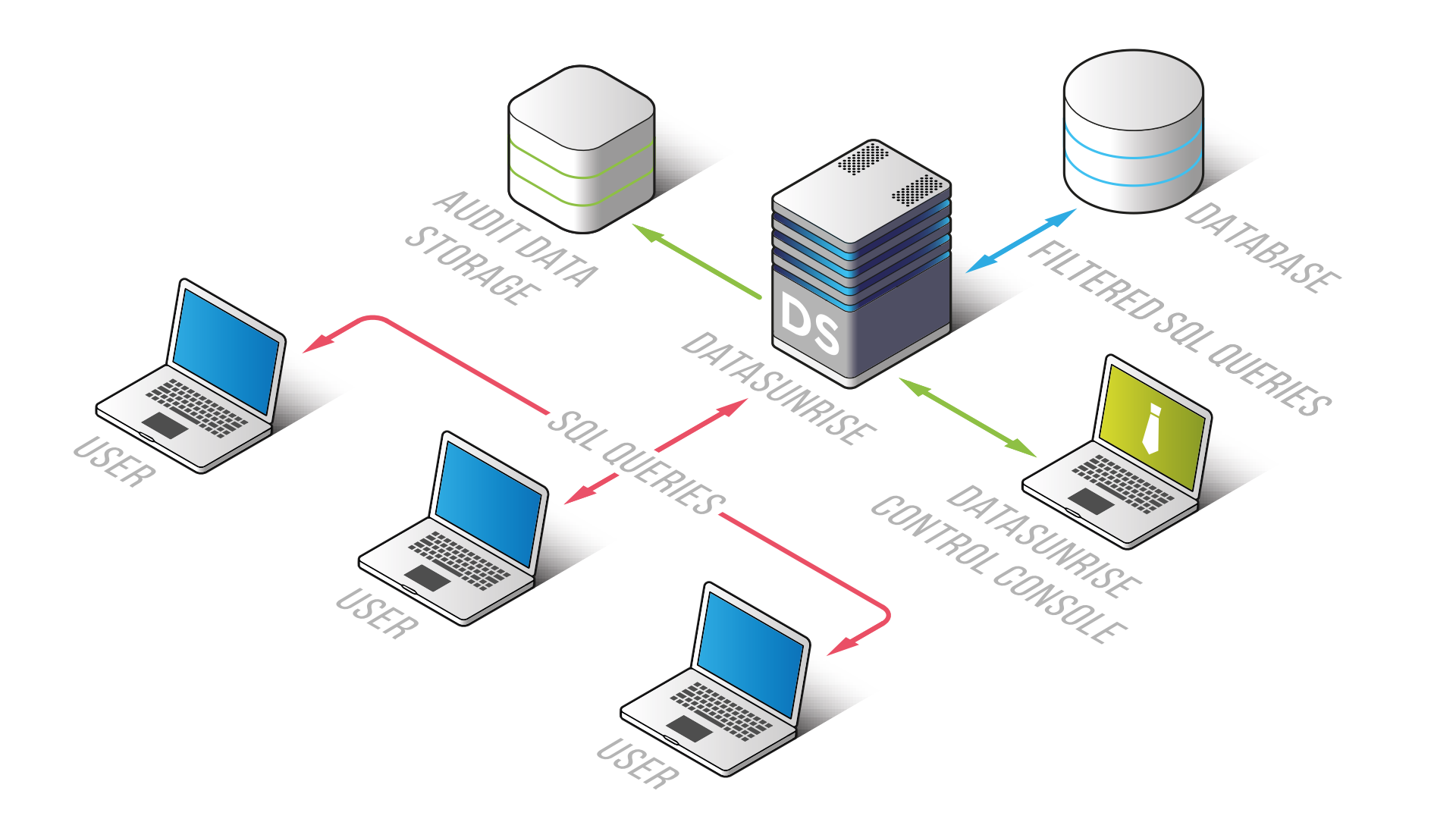
If you want to know how to audit database activities the right way, you’re in the right place. I help teams design audits that pass tough reviews, cut noise, and surface real risk. This guide gives you a full, practical plan for how to audit database activities across SQL and NoSQL systems, on-prem and in the cloud.

Why auditing database activities matters
Most data breaches start with one quiet change. A dropped index here. A rogue admin there. Without a solid audit, you fly blind. A strong audit tells you who did what, when, from where, and why.
Auditing proves trust to your users, your auditors, and your board. It supports SOC 2, ISO 27001, HIPAA, GDPR, and PCI-DSS controls. It also boosts uptime because you can trace root causes fast.
The secret is focus. Track events that show risk, not every call. That is the core of how to audit database activities with impact.
Core principles for a reliable database audit
Think like a detective and a mechanic. You want proof and smooth performance. These principles keep you on course.
- Accountability. Tie every action to a person, service, and device.
- Minimalism. Log what matters for risk, not every ping.
- Integrity. Store logs where even admins cannot tamper with them.
- Performance. Measure overhead before and after you turn on auditing.
- Privacy. Avoid logging raw secrets or personal data.
If you follow these, how to audit database activities becomes a repeatable craft, not guesswork.
Step-by-step plan: how to audit database activities
You can roll this out in a week for a small stack. Larger estates take longer. The steps stay the same.
1) Define outcomes
- What risk are you trying to catch?
- Which laws or standards apply?
- Who reads the logs and how often?
2) Inventory systems
- List databases, versions, and owners.
- Note where they run: on-prem, cloud, managed.
- Map data sensitivity.
3) Choose events to track
- Auth events, role changes, schema changes, data access on sensitive tables, and admin actions.
- Block risky queries by size, time, or table.
4) Map to controls
- Link events to SOC 2 CC6, ISO 27001 A.8, NIST AC and AU families.
- Set retention to meet your policy.
5) Pick tools and a pipeline
- Use native audit features.
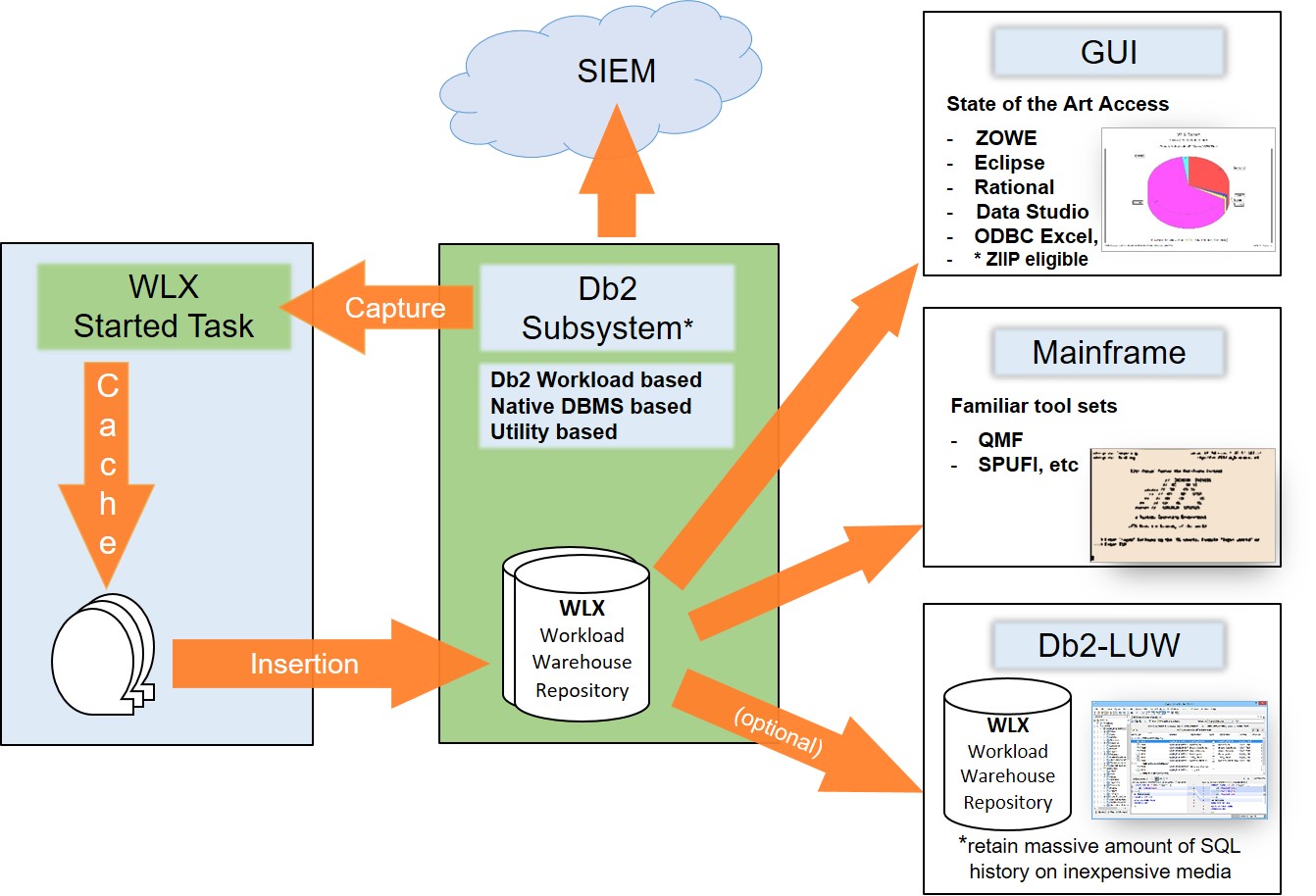
- Send logs to a SIEM or log lake.
- Add alert rules and dashboards.
6) Test in lower envs
- Measure overhead and log volume.
- Validate format and timestamps.
- Run drills for alerts.
7) Deploy with a change plan
- Roll out by risk tier.
- Set a fallback if load rises.
- Announce who to call for issues.
8) Run and refine
- Review alerts weekly.
- Tune filters to cut noise.
- Review access to logs each quarter.
This is the practical rhythm of how to audit database activities without burning time or budget.
What to log: events that show risk
You do not need every SELECT. You need signals that show intent or impact. Use this short list as your base.
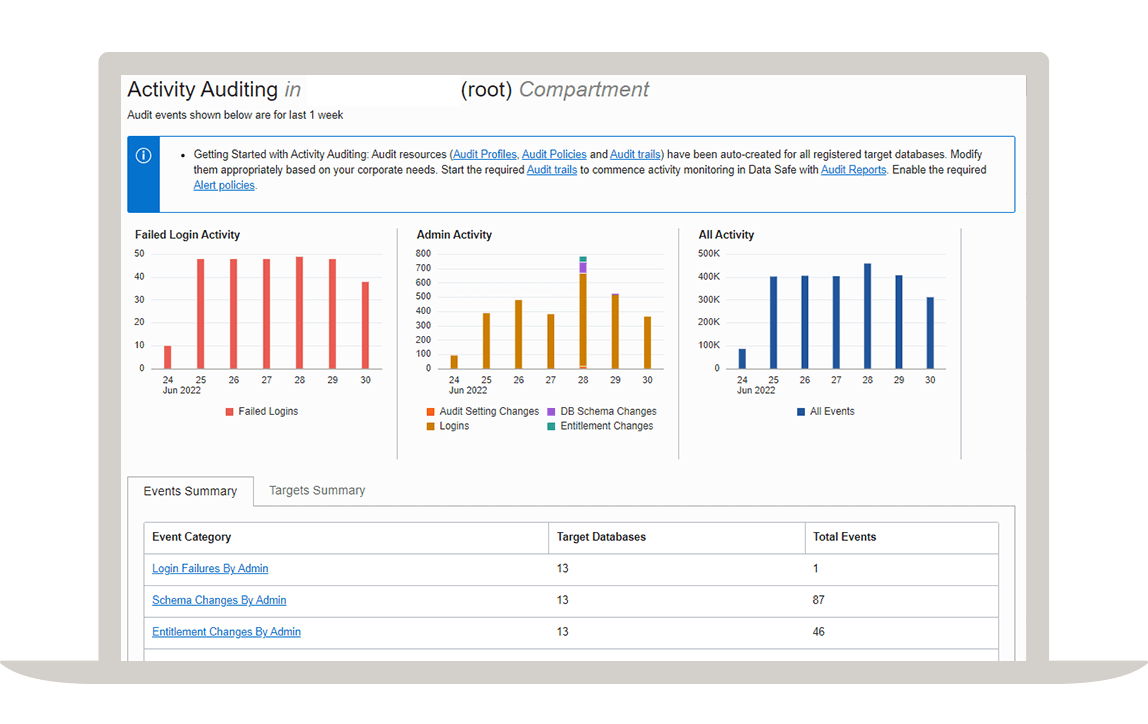
- Authentication. Success, failure, MFA bypass, source IP, client tool.
- Authorization. Role grants, revokes, privilege changes, group changes.
- Schema changes. CREATE, ALTER, DROP on tables, views, functions, procedures.
- Data access on crown jewels. SELECT, INSERT, UPDATE, DELETE on sensitive tables.
- Admin actions. BACKUP, RESTORE, LOAD DATA, COPY, EXPLAIN ANALYZE with long time, config changes.
- Anomalies. Unusual query time, row counts, off-hours access, new client fingerprints.
If you want to scale how to audit database activities, start with these. Then add depth only where risk demands it.

Platform-by-platform checklist
You cannot copy one config to all engines. Use the best native features. Below are quick notes that have saved me many times.
PostgreSQL
- Use pg_audit for detailed statements and object-level logs.
- Set log_line_prefix with user, db, pid, and application_name.
- Send to syslog or cloud logging to secure storage.
MySQL and MariaDB
- Enable the Audit Log Plugin or MariaDB Audit Plugin.
- Capture CONNECT, QUERY, and TABLE events on sensitive sets.
- Watch for SELECTs that scan large row counts.
SQL Server
- Use SQL Server Audit for server and database scopes.
- Track ALTER, GRANT, and SELECT on sensitive schemas.
- Send to Windows Event Log and forward to SIEM.
Oracle
- Use Unified Auditing and Fine-Grained Auditing (FGA).
- Log on sensitive columns and by condition.
- Protect audit trails with Database Vault if you can.
MongoDB
- Enable auditLog with filter rules.
- Use the profiler only for short bursts.
- Track role changes and large aggregate runs.
Cloud-managed and analytics
- Snowflake Access History, Query History, ACCOUNT_USAGE views.
- BigQuery Audit Logs and INFORMATION_SCHEMA.JOBS.
- AWS RDS and Aurora with CloudTrail and enhanced logs.
- Azure SQL Auditing with Log Analytics.
- GCP Cloud SQL audit logs in Cloud Logging.
Use vendor hardening guides and CIS Benchmarks as a sanity check. That is the hard truth of how to audit database activities at scale.
Building useful alerts, not noisy ones
Alert fatigue kills audits. Tie alerts to intent and impact. Keep the list short and clear.
- Repeated auth failures from a new country or ASN.
- Privilege escalation outside change windows.
- Schema changes on protected objects.
- Large data export or full table scans on PII.
- New admin tool or driver touching production.
- Access to backup files or snapshot APIs.
Set thresholds with a baseline week. Review false positives fast. This is key in how to audit database activities that people trust.
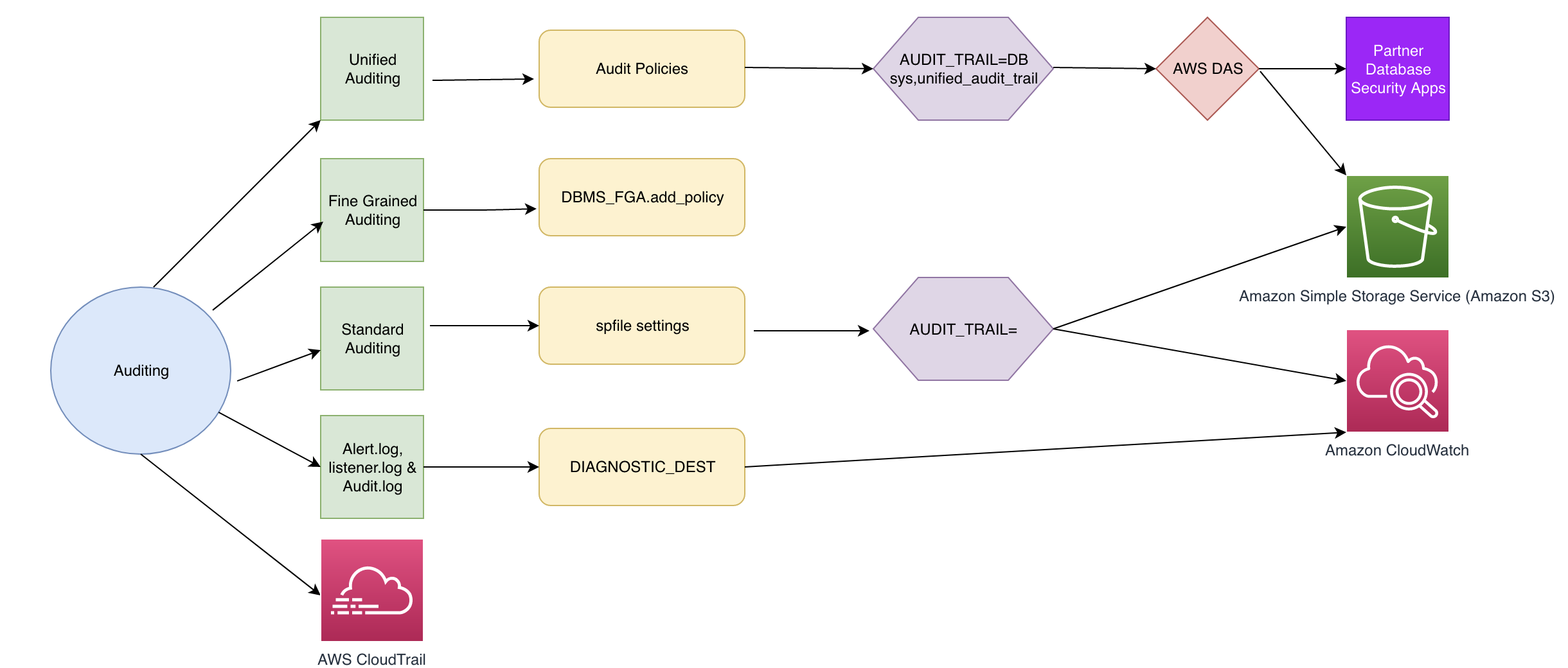
Storage, retention, and tamper-proofing
Logs are evidence. Treat them like artifacts. Protect them from edits and loss.
- Centralize logs off the database host.
- Use write-once options like object lock or immutable storage.
- Encrypt in transit and at rest.
- Split duties. DBAs should not delete or edit logs.
- Keep hot logs for 30–90 days. Archive for 1–7 years as policy demands.
Document your chain of custody. It will help during audits and incidents.

Reporting and compliance mapping
Do not drown auditors in raw logs. Give them views that answer control questions fast.
- A control matrix that maps events to controls.
- Monthly summaries: who changed what, when, where.
- Exceptions closed with tickets and approvals.
- Evidence packs: screenshots, queries, and signed reports.
This approach makes how to audit database activities pass external audits with less stress.

Performance and cost management
Auditing adds load and cost. Measure both and tune early.
- Start with statement classes, not full payloads.
- Exclude noisy system schemas and health checks.
- Sample read events but log all writes and grants.
- Compress logs and batch exports.
- Watch IOPS and CPU after enabling audit.
If overhead rises, reduce depth, not coverage of critical paths.
Common mistakes and lessons I learned
I have made these mistakes. You can skip them.
- Logging everything. It flooded storage and hid the signal.
- Keeping logs on the same box. A crash lost both data and evidence.
- No owner for alerts. Issues sat for days.
- Ignoring privacy. One team logged raw card numbers by accident.
The cure is simple. Scope tight. Store safe. Assign owners. Review often. This is the human side of how to audit database activities.
Example: a simple, safe rollout
Here is a small plan I used for a fintech team with PostgreSQL and Snowflake.
- Week 1. Enable pg_audit on writes and grants in staging. Define sensitive tables. Set role change alerts.
- Week 2. Turn on Access History in Snowflake. Add alerts for large exports. Send both to the SIEM.
- Week 3. Roll to prod with a backout plan. Hold a 30-minute drill. Adjust thresholds by 20% based on real load.
They passed SOC 2 with clean evidence and lower noise than before.
KPIs that prove your audit works
Pick a few metrics. Review them monthly with owners.
- Mean time to detect risky change.
- False positive rate on audit alerts.
- Coverage of critical tables by audit policy.
- Log integrity checks passed.
- Time to produce evidence for an audit request.
These make how to audit database activities measurable and worth the spend.
Security, privacy, and ethics
Logs can expose secrets. Protect people and data.
- Mask or hash sensitive fields in logs.
- Keep IPs and user IDs only as long as needed.
- Limit who can see raw logs.
- Publish your policy to users and staff.
Trust comes from care, not just controls.
Automation and DevSecOps integration
Bake audits into builds so they do not drift.
- Use code to define audit policies and alerts.
- Test audit rules in CI with sample events.
- Add templates for new databases.
- Run weekly checks for disabled auditing.
Automation locks in how to audit database activities as part of normal work.
Frequently Asked Questions of how to audit database activities
What is the first step in how to audit database activities?
Start with clear goals and scope. Decide which risks matter and which systems to cover first.
Does auditing slow my database?
It can, but you can tune it. Start with key events and measure overhead before and after.
How long should I keep audit logs?
Keep hot logs 30–90 days and archive per policy or law. Many teams store 1–7 years for compliance.
Should I log every SELECT?
No, focus on sensitive tables and unusual volume. Log all writes, grants, and schema changes.
How do I protect logs from tampering?
Store logs off-host in immutable storage and enforce least privilege. Use separate roles for DBAs and security.
Which tools should I use for how to audit database activities?
Use native audit features and send to a SIEM. Add dashboards and alerts based on risk.
How often should I review alerts and reports?
Do weekly triage and monthly reviews with owners. Tune rules when noise rises.
Conclusion
A strong audit turns chaos into clear facts. Start small, aim at real risk, and build a clean pipeline for logs, alerts, and reports. That is the heart of how to audit database activities that stand up to any test.
Pick one database today. Enable core events. Send them to your SIEM. Review alerts next week and tune. Want more guides like this? Subscribe, share your wins, or drop a question in the comments.



